Crimson Desert Nature’s Grasp Not Working Fix
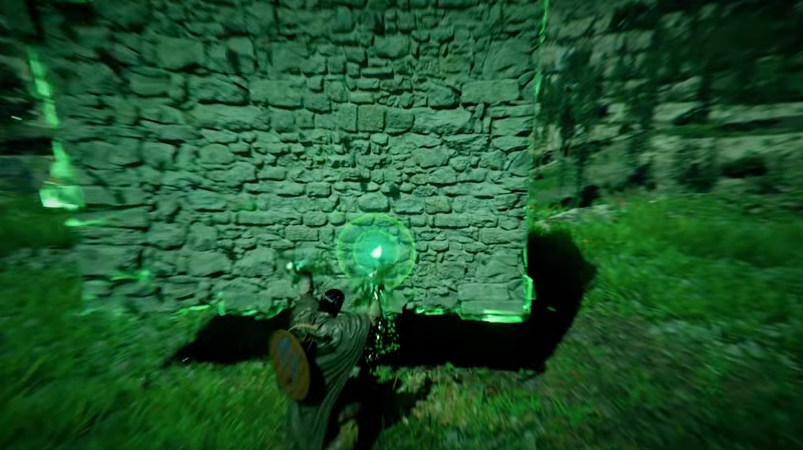
Getting stuck on Nature’s Grasp in Crimson Desert is one of the more frustrating early issues. The skill is tied to main quest progress, so if it does not trigger properly, you can get completely blocked. The good news is there are a few fixes that work depending on what caused it.
How To Fix Nature’s Grasp Not Working In Crimson Desert
Nature’s Grasp not working is usually caused by the observe prompt not triggering correctly or the sequence breaking, and it can often be fixed by standing extremely close to the wall, reloading a save, or restarting the game.
Most Common Causes Of The Bug
This issue usually happens in a few specific ways.
The door or wall is already open before learning the skill
The observe prompt never appears
The learning bar fills but nothing happens
The NPC or interaction disappears
If any of these happen, the quest can stop progressing.
Fix 1 Get Closer To The Wall
This is the easiest fix and works for a lot of players.
Walk right up to the wall or door
Stand almost pressed against it
Wait for the prompt to appear
The interaction only triggers at very close range, not from a distance.
Fix 2 Observe The Correct Target
Sometimes the game wants a very specific interaction point.
Look at the character lifting the wall, not just the door
Move your camera around slowly
Try again from different angles
This can force the prompt to appear.
Fix 3 Restart The Game
A simple restart can fix the bug.
Fully close the game
Relaunch it
Return to the same spot
Some players report the prompt appearing correctly after this.
Fix 4 Reload An Earlier Save
If the sequence broke, this is one of the most reliable fixes.
Load a save before entering the area
Redo the section properly
Do not skip ahead or enter from unintended paths
If you entered early or solved things out of order, the script can break.
Fix 5 Avoid Sequence Breaking
This is the main cause of the issue.
Do not enter the area before the quest tells you to
Do not bypass the door or puzzle early
Follow the intended path step by step
If you skip ahead, the game may not trigger the skill learning event.
Fix 6 Progress Inside The Area
In some cases, moving forward can fix it.
Go through the door if possible
Interact with the next objective
Return to the skill prompt
This can sometimes complete both steps at once.
When There Is No Fix
If none of the above works:
The save file may be bugged
You may need to reload an older checkpoint
In worst cases, a restart is required
This is rare, but it has happened.
How To Avoid The Bug
Save often before main quest steps
Do not explore quest areas early
Follow objectives in order
Keep multiple save files
This prevents losing progress if something breaks.
Final Blurb
The Nature’s Grasp bug in Crimson Desert is tied to how the game handles scripted interactions. Most of the time it comes down to positioning or sequence issues, and a quick fix like standing closer or reloading works. If not, going back to an earlier save is your safest option until a patch fully resolves it.
FAQ
Why can’t I learn Nature’s Grasp in Crimson Desert
The observe prompt is not triggering correctly or the quest sequence broke.
How do you fix Nature’s Grasp not working
Stand very close to the wall, restart the game, or reload an earlier save.
Can you get stuck on this quest permanently
Yes, if the sequence breaks and you have no earlier save.
Will this bug be patched
It is likely to be fixed in a future update, but no confirmed timing yet.