You increase inventory space in Hytale by unlocking the Backpack through workbench upgrades, then equipping Backpack Upgrade items that expand your bag slots. Inventory size is progression based and tied directly to crafting, not passive leveling or item pickups.
This guide explains exactly how backpack upgrades work, what you need at each stage, and how far you can expand your inventory right now.
How Inventory Space Works In Hytale
You do not start with a true backpack.
Until you unlock the Backpack, your inventory is limited and cannot be expanded. All inventory growth comes from crafted upgrades that must be equipped to your character.
Unlocking The Backpack
The Backpack unlock becomes available once you upgrade your Workbench to Tier 2.
To upgrade the Workbench to Tier 2, you need
30 Copper Ingots
20 Iron Ingots
20 Linen Scraps
After upgrading the Workbench, open the crafting menu and locate the Unlock Backpack recipe.
To craft the Backpack unlock, you need
8 Iron Ingots
16 Medium Leather
Once crafted, your inventory space increases immediately.
How Backpack Upgrades Work
Backpack upgrades are separate items that further expand your inventory.
These upgrades are equipped in the final slot on the right side of the character screen. If an upgrade is not equipped, it provides no benefit.
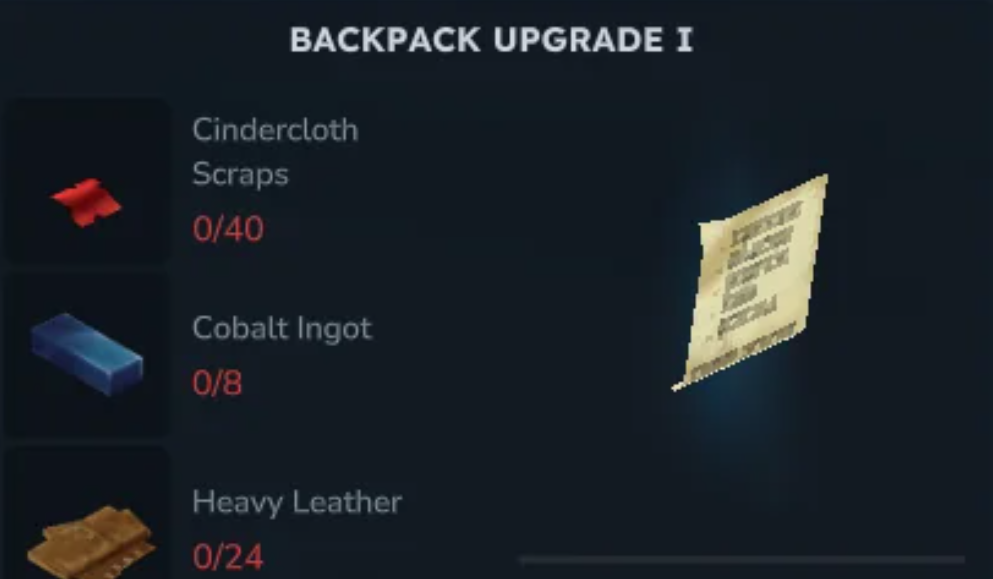
How To Get Backpack Upgrade I
Backpack Upgrade I requires a Tier 3 Workbench.
After upgrading the Workbench, craft Backpack Upgrade I using the tinkering menu.
Required materials are
40 Cindercloth Scraps
8 Cobalt Ingots
24 Heavy Leather
Equip the upgrade in your character screen to gain additional inventory slots.
How To Get Backpack Upgrade II
Backpack Upgrade II is locked behind exploration.
It is unlocked through the Memories system and requires collecting 100 memories. This involves discovering and logging creatures throughout the world.
To access the Memories path, you must visit a Memory Statue in the Edge of the Echo through the Forgotten Temple Gateway.
Once unlocked, return to a Tier 2 or higher Workbench and craft Backpack Upgrade II with the required materials.
Why Inventory Upgrades Matter
More inventory space reduces travel time and lets you stay out longer while gathering resources.
This is especially important during mining, building runs, and long exploration routes where constant banking slows progress.
Common Inventory Upgrade Mistakes
Most issues come from missed steps.
Forgetting to upgrade the Workbench first
Crafting upgrades but not equipping them
Expecting inventory growth without unlocking the Backpack
Ignoring the Memories requirement for Upgrade II
Following the progression path fixes all of these.
Final Blurb
Inventory upgrades in Hytale are earned, not handed out. Upgrade your Workbench, unlock the Backpack, and equip each upgrade as you go. Once expanded, exploration and resource runs feel far smoother, and you spend less time running home with full pockets.
FAQ
Can you increase inventory without crafting
No. All inventory upgrades require crafting.
Where do backpack upgrades go
They are equipped in the final slot on the character screen.
Do backpack upgrades stack
Yes. Each upgrade adds more space when equipped.
Is Backpack Upgrade II required
No. It is optional but very helpful.
Does inventory space affect combat
No. It only affects how much you can carry.
More Hytale Guides