Crimson Desert Examine Key: How To Examine The Engraved Key
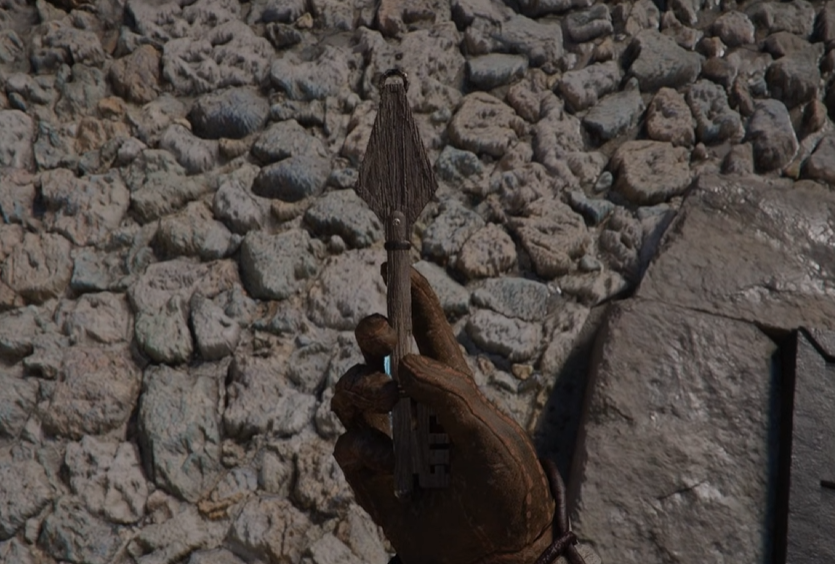
The examine key step in Crimson Desert shows up early in the Mystical Key quest, and it stops progress if you do not use the right input. The game tells you to examine it, but does not clearly show how to actually complete the action, which is where most players get stuck.
How To Examine The Key In Crimson Desert
Open your inventory, select the Engraved Key, then hold the examine input until the inspection completes.
On PC this is CTRL or click-hold, and on controller this is LB or A/X.
Exact Steps To Inspect The Engraved Key
This is quick once you know what the game wants.
Open your inventory
Find the Engraved Key
Select the item to bring it up
Hold CTRL or LB to examine it
Do not tap the button. You need to hold it long enough for the game to register the inspection.
Why The Examine Key Step Is Not Working
This is where most people get tripped up. Opening the key is not enough, and pressing the button quickly will not complete the objective.
The game expects a full examine input, which means holding the button while focusing on the key. If you let go too early, nothing happens, and it feels like the quest is broken.
Where This Happens In The Story
This objective takes place during the Mystical Key quest in Chapter 1. You get the wooden key after helping the old man, and it transforms into the Engraved Key in your inventory.
Once you examine it properly, the quest updates right away and sends you toward Hernand Castle.
What To Do After Examining The Key
After the examine step, the quest continues without any extra steps tied to the key itself. You will move on to entering Hernand Castle using the correct disguise.
If the objective does not update, go back and repeat the examine step and make sure you hold the input fully.
Final Blurb
The Crimson Desert examine key step is simple once you know the trick. Hold the examine input on the Engraved Key, let the inspection complete, and the quest moves forward like normal.
FAQ
How do you examine the key in Crimson Desert
Open your inventory, select the Engraved Key, and hold the examine input.
Why is examine key not working
You are not holding the input long enough for the inspection to complete.
What button examines the key
CTRL on PC and LB on controller.
When does this happen
During the Mystical Key quest in Chapter 1.
What happens after examining the key
The quest updates and sends you to Hernand Castle.