Crimson Desert How To Save
Saving in Crimson Desert is not obvious at first, and a lot of players assume it is fully automatic. The game does have autosaves, but manual saving exists too, just hidden inside the menu.
How To Save The Game In Crimson Desert
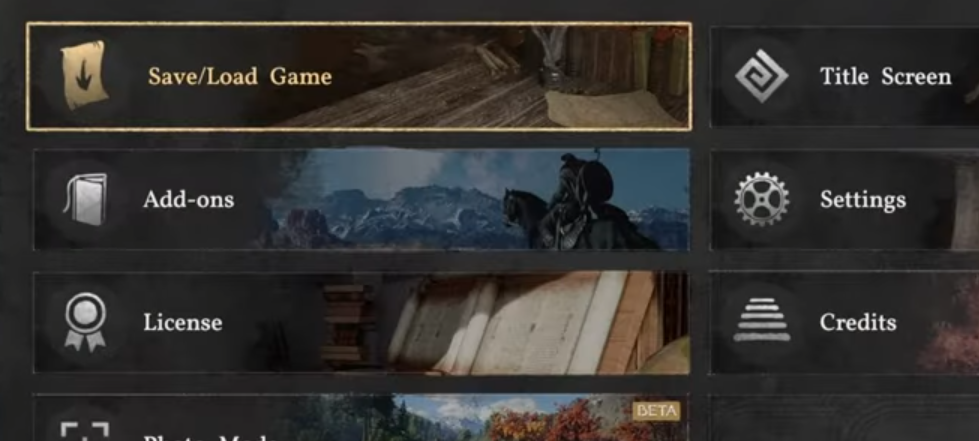
To save your game, open the menu, go to Others, then Options, and select Save or Load Game.
That is where you can manually save and view your autosaves.
Step By Step Save Method
Follow this path exactly.
Open the main menu
Go to Others
Select Options
Click Save or Load Game
Choose to create a manual save
You will also see your recent autosaves here.
Where Autosaves Happen
The game does autosave, but not constantly.
During main story progress
After major events or checkpoints
After certain interactions
Do not rely on autosave if you are about to test something risky.
When You Should Manually Save
Manual saves are important in a few situations.
Before boss fights
Before using rare items
Before testing builds or choices
It saves you from having to redo progress.
Why Players Miss The Save Option
The save system is easy to overlook.
It is hidden under Options, not a main tab
The game does not highlight manual saving early
Autosave gives a false sense of safety
Once you know where it is, it becomes quick to use.
Final Blurb
Saving in Crimson Desert is simple once you know where to look, but the menu placement makes it easy to miss early on. Use manual saves when it matters, and do not rely only on autosave.
FAQ
How do you save in Crimson Desert
Open the menu, go to Others, then Options, and select Save or Load Game.
Does Crimson Desert autosave
Yes, but only at certain checkpoints and story moments.
Where is the save option in Crimson Desert
It is inside Options under the Others menu.
Can you manually save anytime
Yes, as long as you are not restricted by the current situation.
Should you rely on autosave in Crimson Desert
No, manual saving is safer for important moments.