Running a successful shop in PC Store Together takes more than selling expensive hardware. Between customer repairs, retail pricing, component orders, and weekly expenses, small decisions can quickly affect your profits. These tips will help you avoid wasted purchases, finish jobs efficiently, and expand your computer store without creating unnecessary problems.
Repair and Workshop Tips
Building and Expanding Your Store
Co-op and Troubleshooting Tips
Best PC Store Together Tips for Making Money Early
Your opening days are about creating a reliable source of income without spending so aggressively that you struggle to cover operating expenses. The biggest mistake is treating every dollar in your balance as money that's immediately available for expansion.
1. Check Your Weekly Bills Before Spending Your Profits
PC Store Together starts you with limited money, and your business has expenses beyond the products you purchase.
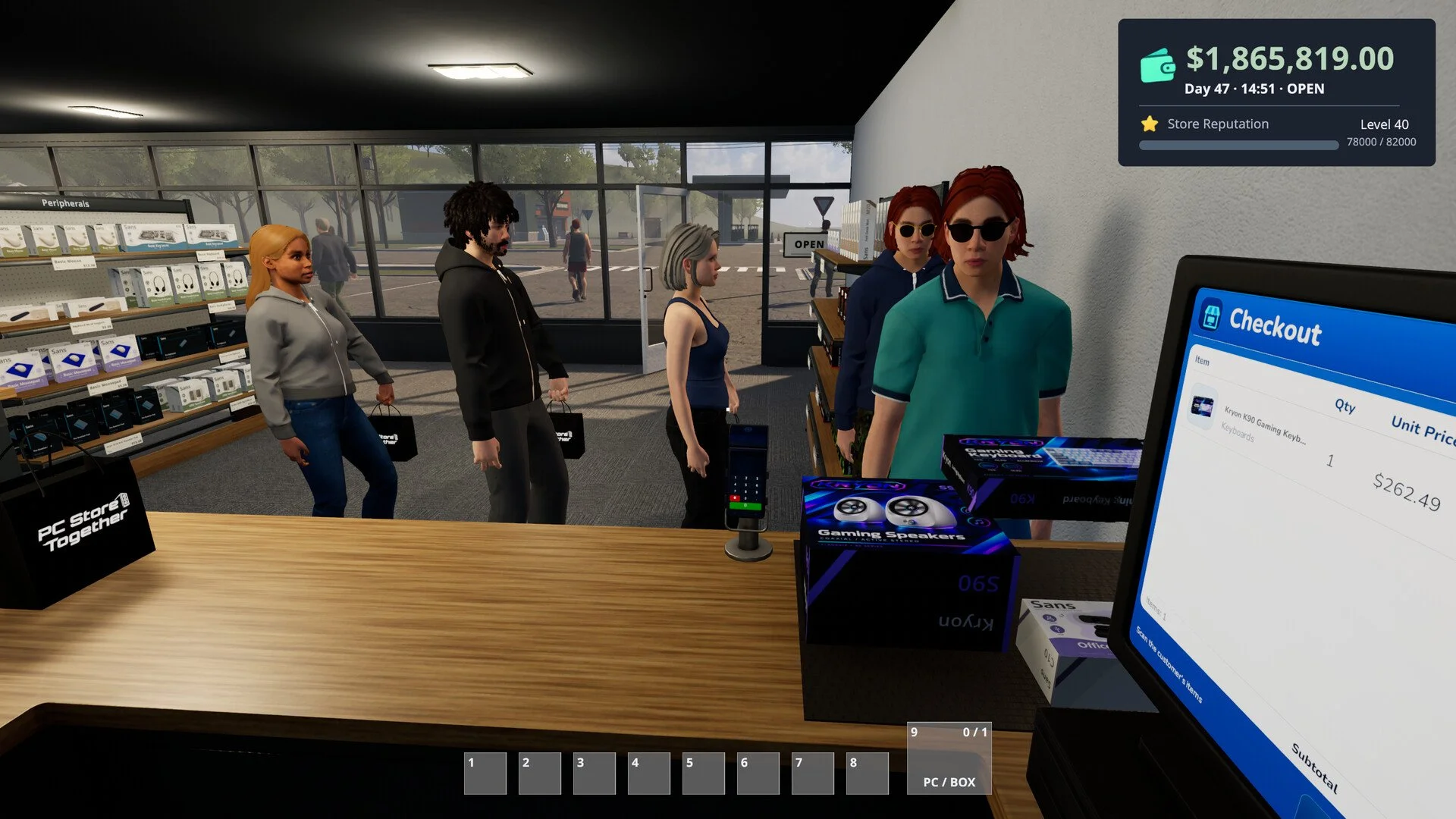
Rent is billed weekly, so opening the Calendar on your shop computer should become part of your financial routine. Check the upcoming payment before purchasing expensive fixtures, additional stock, or new equipment.
A profitable day doesn't necessarily mean you have enough money to expand comfortably. Some of those earnings may already be needed for your next bill.
A useful way to evaluate purchases is to separate your current balance into money needed for upcoming expenses, money required to replenish inventory, and whatever remains for growth.
You don't need a complicated spreadsheet. Simply checking the Calendar before a major purchase can prevent an unnecessary cash shortage.
2. Calculate Profit Per Item, Not Just the Selling Price
Retail pricing involves more than finding a high number customers will accept.
Kestrel Supply sells products in cartons, so the listed purchase price can cover multiple items. Check the cost per unit before deciding what to charge on the sales floor.
For example, a carton containing ten mice for $60 represents a $6 purchase cost per mouse before delivery charges. Selling those mice for $8 each provides a $2 difference per unit before accounting for delivery and other business expenses.
Once you've stocked a shelf, use its Set Price option to compare your chosen selling price against the in-game Market value and displayed profit per item.
Starting near Market is a practical approach while learning customer behavior. You can experiment with higher prices, but repeatedly receiving complaints that an item is too expensive is a reason to reconsider its markup.
The goal is to earn money from completed sales, not simply advertise the largest possible profit on a shelf tag.
3. Restock Based on What Your Store Needs Next
Buying more inventory feels like progress, but money tied up in unsold cartons isn't available for other purchases.
Before placing another supplier order, check your remaining shelf stock and the cartons you already have in storage. The Stock Planner, found near the bottom of the shop computer's Management section, helps you review what needs replenishing.
Kestrel Supply also provides Trending information, including current and upcoming product trends.
Use that information to inform your next purchase rather than automatically buying large quantities of every popular product.
There are three useful questions to consider before restocking:
- Are customers buying through your existing supply quickly enough to justify another carton?
- Do you have somewhere to place the delivery without cluttering your storage space?
- Will the purchase leave enough cash for bills, repairs, and other commitments?
Smaller, purposeful orders can be easier to manage than purchasing a large amount of inventory without knowing how quickly it will sell.
PC Store Together Repair and Workshop Tips
Customer computer jobs require a different approach from ordinary retail sales. A repair can involve several separate objectives, and a computer that powers on isn't necessarily ready to return.
4. Keep Retail Inventory and Workshop Parts Separate
PC Store Together uses different purchasing and storage systems for merchandise and computer components.
Kestrel Supply's Stock Store supplies boxed products for retail shelves. The PC Parts Store supplies individual components for workshop use, while accepted customer jobs can have their missing parts ordered directly through Tech Support Mail.
This distinction matters because a part sitting in a retail carton isn't automatically available for installation at the workbench.
When working on a customer repair or exact-parts build, check the job in Mail before purchasing components. The Order missing parts option helps you acquire the required equipment without confusing it with merchandise intended for sale.
Likewise, avoid selling an individual workshop component without checking whether an accepted repair still needs it.
The simplest approach is to treat your sales inventory and repair inventory as two separate responsibilities, even though both belong to the same business.
5. Diagnose the Actual Problem Before Replacing Components
When a customer's computer fails, guessing at replacement parts can waste money and leave the original problem unresolved.
Start by reading the customer's job card and the Build Sheet at the workbench. The job card identifies the requested work, while the Build Sheet provides information about the computer's current condition.
Pay particular attention to the difference between power problems and cooling problems.
A computer that shuts down during a Load test might have enough power available but still be overheating. Replacing its power supply wouldn't necessarily address that failure.
The in-game Load test runs for 25 seconds and uses two important CPU temperature thresholds:
If a computer fails from heat, inspect the cooler and any thermal paste requirements before running another test. Cleaning dust alone may satisfy one objective without resolving the temperature issue.
Using the diagnostic information to narrow down the fault is much more efficient than purchasing random replacement hardware.
6. A Passing Test Doesn't Mean the Repair Is Finished
One easily overlooked part of PC Store Together is that customer jobs have completion requirements beyond basic functionality.
A PC might successfully start and pass its Load test while the job card still shows unfinished work.
Before returning a repaired computer, inspect the remaining objectives. Depending on the order, you may need to reinstall the customer's original working components, replace the side panel, tighten its screws, or complete another requested action.
Some jobs also require contacting the customer through Mail before their collection can take place.
This is especially important when replacing RAM or storage drives. The game distinguishes between installing a working replacement and returning any original component the customer expects to keep.
Don't judge completion by whether the machine looks functional. The job checklist is the deciding factor.
If Tech Support refuses a computer, read the on-screen explanation. Recent updates improved these messages to identify remaining requirements rather than leaving players guessing.
PC Store Together Tips for Building and Expanding Your Store
Growth involves balancing new products, better facilities, and the money needed to operate them. Expanding too aggressively can create additional costs without immediately improving your income.
7. Don't Buy a Licence Unless You Can Afford the Stock
Shop Licences unlock access to new product ranges, but purchasing a licence doesn't automatically fill your shelves with those products.
You'll still need to order the newly unlocked merchandise and have suitable places to display or store it.
Before purchasing a stock licence, use View products to see what's included. Then compare its fee with the additional money you'll need to spend on actual inventory.
Also pay attention to the difference between Stock licences and PC parts licences. They serve different parts of your business, so unlocking one category doesn't necessarily help with the other.
A new licence is most useful when you're prepared to sell or use what it unlocks. Otherwise, it may be better to keep your current products stocked and save the expansion for later.
8. Display PCs Can Bring More Buyers, but Watch Your Margins
Building computers for your own sales floor offers another way to attract customers beyond selling boxed accessories.
However, a display PC should be treated as a business investment, not an automatic profit.
The November 25 updates changed two important mechanics. Having a priced PC on display increases the frequency of PC buyers by three times, but new components now contribute only 65% of their purchase price toward a built PC's value.
That creates a tradeoff. A display can bring more potential buyers into the shop, but building a computer with expensive new parts doesn't guarantee you'll recover their full cost through the sale.
Check the cost of your components against the price you'll actually receive before building several machines for display.
Also remember that a finished PC needs a graphics card installed before it can be sold. After testing the machine, place it on a sales display and confirm that you've assigned a price.
Rather than filling multiple displays immediately, consider starting with one completed machine and observing how its sale fits into your store's finances.
More buyer visits can be valuable, but only if the resulting transactions make sense for your business.
PC Store Together Co-op and Troubleshooting Tips
9. Assign Players Based on What's Holding Up the Store
PC Store Together supports up to four players working in the same shop. That creates opportunities to handle several responsibilities simultaneously, but fixed roles aren't always the most efficient approach.
For example, keeping one player at the checkout counter while no customers are waiting may be less useful than having that person help with deliveries or restocking.
Instead, pay attention to which activity currently has the longest queue.
If customers are waiting to pay, checkout needs attention. If repair orders are accumulating, assigning another person to workshop jobs may make more sense. When shelves are empty and deliveries have arrived, moving someone to inventory can help the sales floor recover.
The same flexibility matters when closing the shop. Any player can now end the day, so communicate before doing so, especially if someone is still handling a delivery or checking an unfinished customer order.
Coordination becomes more useful as the shop grows because several problems can develop at once.
10. Check for Updates Before Troubleshooting Older Bugs
PC Store Together received several substantial fixes immediately after launch, including changes affecting multiplayer, customer repairs, storage, and performance.
Some issues described in early discussions may no longer occur on the current version.
For example, the developers fixed repair objectives that failed to complete when replacement RAM or storage drives were installed in different compatible slots. They also addressed certain multiplayer connection failures and severe lag when opening heavily stocked workshop storage.
If something appears broken, check that your Steam installation is updated before spending time rebuilding a computer or rearranging your shop.
For co-op connection problems, compare the version numbers shown in the game's main menu or Esc menu. Players on different versions need to update before joining the same session.
If you're experiencing performance problems, the November 25 optimization updates are particularly relevant. They reduced CPU workload, improved frame consistency, and addressed several causes of stuttering.
Keeping the game updated won't prevent every problem, but it helps you avoid troubleshooting behavior that the developers have already corrected.
The Most Important Habit for Running a Better PC Store
The best improvement you can make in PC Store Together is to identify which part of your business is currently slowing everything else down.
Empty shelves need inventory. Unsold stock needs attention to pricing and customer demand. Unfinished repairs need accurate diagnosis. Expensive expansions need enough income to support them.
These problems require different solutions, and spending money indiscriminately rarely addresses all of them.
Focus on keeping your existing store productive before adding another responsibility. Once customers are being served consistently, orders are progressing, and upcoming bills are covered, you'll have a much stronger foundation for expansion.