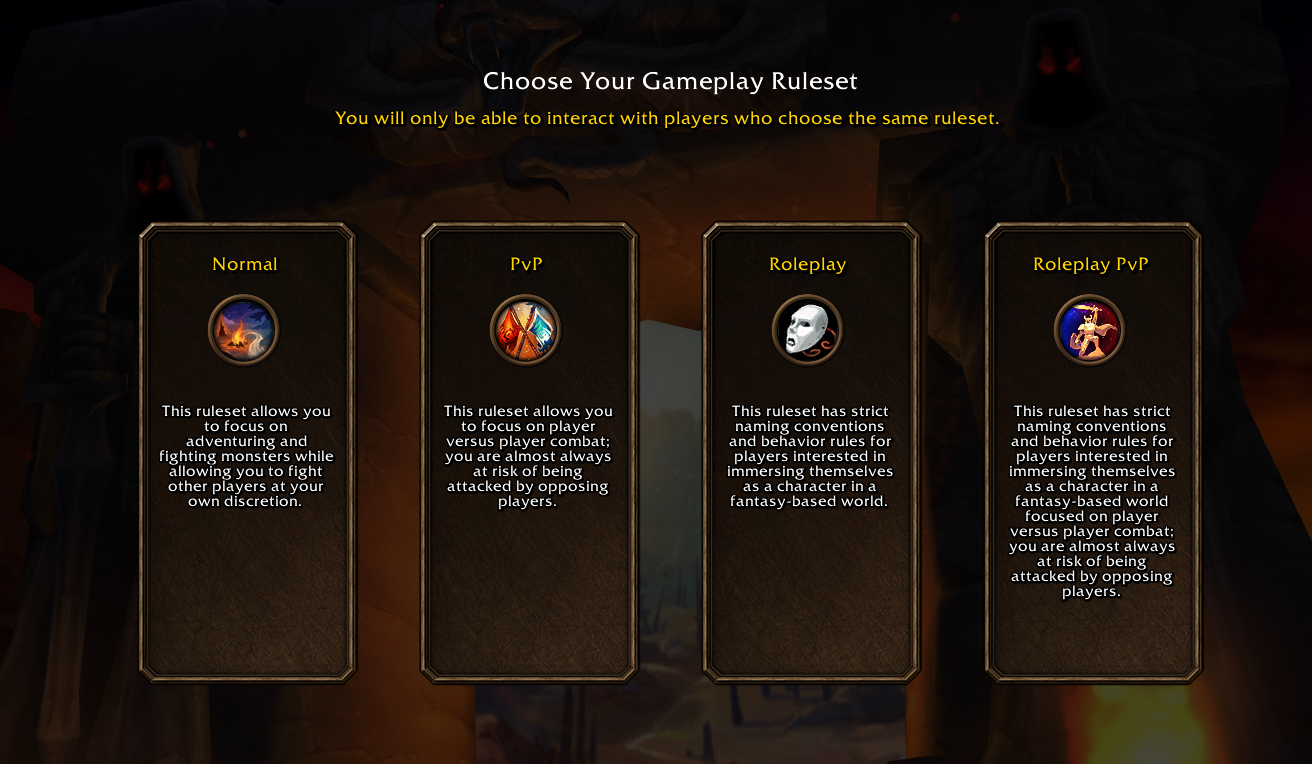
Trying to enter WoW Forever only to find every ruleset grayed out can be frustrating, especially after you've already made it through the login queue. The "This ruleset is temporarily unavailable" message has prevented players from selecting Normal, PvP, Roleplay, and Roleplay-PvP. Fortunately, several players have found a workaround, although there's an important downside to consider before trying it.
How to Fix the Ruleset Error
Should You Cancel or Wait?
Why Rulesets Are Unavailable
What to Do if It Still Doesn't Work
Common Questions
How to Fix Ruleset Temporarily Unavailable in WoW Forever
To fix the "This ruleset is temporarily unavailable" error in WoW Forever, try canceling out of the ruleset selection screen and logging in again. Multiple players have successfully accessed their preferred ruleset after rejoining the login queue, even when all four choices were previously unavailable.
Here's the workaround:
- Reach the ruleset selection screen where Normal, PvP, Roleplay, and Roleplay-PvP appear.
- If your preferred ruleset is grayed out, select Cancel.
- Reconnect to WoW Forever and rejoin the login queue.
- Once the queue finishes, return to ruleset selection.
- Check whether your preferred ruleset can now be selected.
Several players confirmed that their rulesets became available on the second login attempt. Others needed additional attempts or continued encountering the same problem.
This is a player-tested workaround, not a guaranteed fix. It also means going through the login queue again, which can be inconvenient when many players are trying to connect.
Should You Cancel or Wait on the Ruleset Screen?
This is the biggest decision when encountering the error.
Canceling gives you another opportunity to connect, but it also removes you from your current login session and returns you to the queue.
Remaining on the selection screen avoids immediately rejoining the queue, although players who tried waiting reported that their unavailable rulesets didn't automatically become selectable.
| Option | What Happens | Main Drawback |
|---|---|---|
| Cancel and reconnect | Starts a new login attempt. This has worked for multiple players. | You must enter the queue again. |
| Stay on the selection screen | Keeps the current screen open without reconnecting. | No reliable automatic refresh has been established. |
My recommendation is to try reconnecting if you've been stuck with every ruleset unavailable and nothing is changing.
However, consider the queue before doing so. Some players returned to relatively short queues, while others found themselves behind thousands of additional players.
The workaround isn't guaranteed to succeed, so don't assume canceling will get you back into the game immediately.
Why Are WoW Forever Rulesets Temporarily Unavailable?
The error appeared during WoW Forever's November 4, 2026 launch, when players were able to reach the login system but couldn't always proceed through ruleset selection.
Because many players encountered the same issue simultaneously, the widespread all-rulesets-unavailable problem points toward launch service availability rather than a problem with an individual computer.
However, not every unavailable ruleset message necessarily represents the same situation.
All Four Rulesets Are Grayed Out
If Normal, PvP, Roleplay, and Roleplay-PvP are all unavailable at once, you're encountering the widespread selection problem reported during launch.
Reconnecting is the main workaround worth attempting.
You shouldn't need to reinstall the game simply because every ruleset is temporarily inaccessible.
Only One Ruleset Is Unavailable
If other rulesets are selectable but your preferred option remains grayed out, the situation is different.
That particular ruleset may not be accepting selections at the moment, even while others are accessible.
Don't automatically switch to Normal or PvP just because it's available if you actually intend to play on Roleplay or Roleplay-PvP.
Your ruleset determines which multiplayer environment you join, so it's worth choosing the one you actually want rather than making a rushed selection to get past the error.
You Can Select a Ruleset but Still Can't Create a Character
This is another distinction worth checking.
Players have also encountered messages about character creation being temporarily throttled or a faction being unavailable.
Those errors involve character creation restrictions rather than the entire ruleset selection screen being disabled.
If you can select your ruleset but receive a different error afterward, the reconnect workaround discussed here may not address that separate restriction.
What to Do if WoW Forever Rulesets Are Still Unavailable
If reconnecting doesn't work, repeatedly restarting the game isn't necessarily going to produce a different result.
Some players have successfully connected on their second attempt, while others continued seeing unavailable rulesets even after multiple retries.
At that point, use the following checks to narrow down the problem.
Check Whether Other Players Are Experiencing the Same Error
Look for recent reports on the official WoW Forever forums and Blizzard's service channels.
If large numbers of players are reporting the same grayed-out ruleset screen, it's a strong indication of a wider service problem.
In that situation, local troubleshooting is unlikely to resolve the underlying issue.
Check the Official Server Status
Blizzard provides a server status page for WoW Forever, allowing players to check service availability.
Keep in mind that being able to reach the login screen doesn't necessarily mean every subsequent service is accepting players.
It's possible to complete the initial login process and still encounter a ruleset selection problem afterward.
Avoid Reinstalling the Game for a Widespread Ruleset Outage
When every ruleset is unavailable for large numbers of players simultaneously, reinstalling WoW Forever or running file repairs isn't a meaningful first troubleshooting step.
Those actions won't make unavailable server-side services accept connections.
Instead, concentrate on determining whether the ruleset selection issue is widespread and whether reconnecting changes the result.
Verify the Correct Ruleset Once You Get In
There's one additional precaution worth taking after successfully connecting.
Some players have encountered separate problems involving characters appearing under a different ruleset than the one they originally selected during name reservation.
Before investing significant time leveling a character, confirm that you're entering the intended ruleset.
This is particularly important if you're planning to play with friends who have already chosen Normal, PvP, Roleplay, or Roleplay-PvP.
WoW Forever Ruleset Error FAQ
Does Cancel Put You Back in the Login Queue?
Yes. Canceling out of the unavailable ruleset screen can return you to the login queue, potentially with more players ahead of you than before.
However, reconnecting has allowed multiple affected players to select their rulesets successfully.
Will the Rulesets Become Available if You Just Wait?
It's possible for server availability to change, but the supplied launch reports don't establish that an already-open ruleset selection screen reliably refreshes itself.
Several players who waited found that their choices remained unavailable, while reconnecting worked for others.
Does Reconnecting Always Fix the Problem?
No. Although multiple players reported success, some rejoined the queue only to encounter the same error again.
The workaround provides another chance to access ruleset selection, not a guaranteed way around server availability problems.
Is WoW Forever Down if Every Ruleset Is Grayed Out?
Not necessarily. The login service can be accessible while ruleset selection remains unavailable.
Other players may already be playing even if you're unable to select a ruleset at that moment.
If you've encountered this error, the most useful first step is to try one reconnect while keeping the possible queue wait in mind. If the problem persists and other players are reporting the same thing, further local changes are unlikely to help until the affected service becomes available.