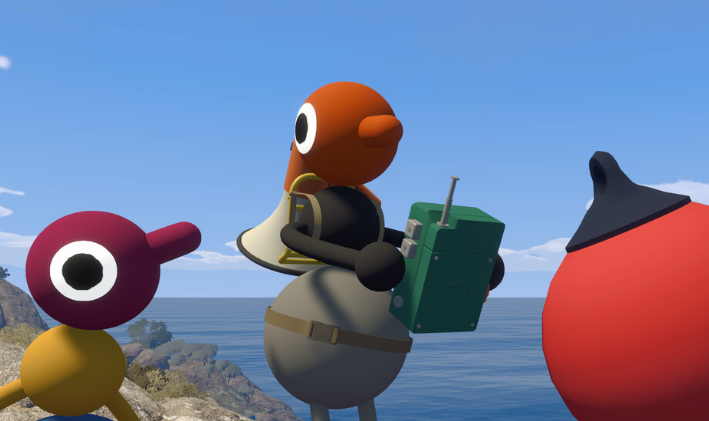
The walkie-talkie is one of the most useful items in Big Walk once your group stops traveling as one giant pack. Normal voice chat fades quickly with distance, and even nearby friends can become difficult to hear if they are facing away from you or moving over the other side of a hill.
Carrying a walkie-talkie allows players in different parts of the island to stay in contact. It also works with Big Walk’s text chat, although storing one on your back or hip changes what you can do with it.
Jump To Section:
How the Walkie-Talkie Works
Where to Find Walkie-Talkies
Holding vs. Storing One
How to Use Them as a Group
Radio Stations and the Train
Walkie-Talkies and Text Chat
What Happens Between Sessions
Walkie-Talkie Not Working
How the Big Walk Walkie-Talkie Works
Hold a walkie-talkie while using Big Walk’s normal in-game communication and your voice can reach other players carrying compatible equipment elsewhere on the island.
This becomes important because ordinary proximity chat is intentionally restrictive. Distance lowers the volume of another player’s voice, while hills, walls, buildings, and the direction someone is facing can make them even harder to understand.
A walkie-talkie allows your group to separate without immediately losing all contact. It is especially useful when one team is carrying puzzle rewards while someone else remains near a tower, transportation system, or unfinished challenge.
You do not need one when everyone is standing together. Normal proximity chat already works at close range, and keeping the walkie-talkie in your hand means giving up space that could otherwise be used for a flashlight, map, compass, or puzzle item.
Where to Find Walkie-Talkies in Big Walk
Walkie-talkies can be found around the island, and there are enough available for several players to carry them. They are not permanently unlocked through one specific tower or handed to the entire group at the beginning.
Because equipment is scattered across the map, your group may not have enough for every player immediately. That is not really a problem, as one radio in each separated team is usually more useful than giving one to every person standing in the same place.
Do not confuse the walkie-talkie with the portable music radio. The music radio plays sound that nearby players can follow, while the walkie-talkie is used for direct communication between separated players.
Holding a Walkie-Talkie vs. Storing It
A walkie-talkie behaves differently depending on whether it is in your hand or attached to your character.
- Held in your hand: You can hear incoming communication and speak through the walkie-talkie.
- Stored on your back or hip: You can still hear incoming communication, but you cannot answer through it.
This makes stored walkie-talkies useful for players who mainly need to receive instructions. Someone carrying an important object can place the radio on their hip, keep their hand available, and continue listening to directions from the rest of the group.
The problem appears when that player needs to reply. You cannot remove equipment from your own back or waist, so another friend has to take the walkie-talkie out and hand it back to you.
I would avoid attaching every radio to the group’s backpacks without thinking about who actually needs to talk. It is very possible for several people to hear the same message while nobody is able to answer it.
How to Use Walkie-Talkies With a Group
Walkie-talkies are most effective when they are divided between teams rather than individual players.
If six people split into three pairs, give one walkie-talkie to each pair. That keeps all three groups connected without wasting inventory space on duplicate equipment.
They are particularly helpful for:
- Coordinating players on opposite sides of a puzzle.
- Keeping track of someone carrying a key or puzzle reward.
- Directing a group from a tower or high viewpoint.
- Finding players who took a different path.
- Telling friends when a train or chairlift is approaching.
- Confirming which areas have already been searched.
The person most likely to give directions should keep the walkie-talkie in their hand. A player who only needs to listen can store it and carry another tool instead.
This becomes even more important in larger sessions. Twelve players do not need 12 separate radios, but every group that wanders away should have some way to contact the others. Otherwise, the walkie-talkies all end up together while the people who actually need them are halfway across the island.
Tower Radio Stations and the Train
Some fixed radio stations around Big Walk can communicate with players carrying walkie-talkies. This allows someone at a tower or another fixed position to contact friends moving around the island.
A player using one of these stations can act as a coordinator, especially when they have a better view of the surrounding area or are waiting near an objective.
The train also includes communication equipment that can reach players carrying walkie-talkies elsewhere on the map. This is useful when part of the group boards while everyone else is still traveling on foot.
Our Big Walk train guide explains how to activate the railway, board a train, and use the equipment found onboard.
The portable music radio is still useful in its own way. Its sound can help nearby friends locate you, but it does not replace the actual walkie-talkie when two groups need to have a conversation.
Do Walkie-Talkies Work With Text Chat?
Walkie-talkies work with Big Walk’s built-in text chat as well as voice chat. You can therefore use them without a microphone and still communicate over longer distances.
Text chat follows the same general restrictions as spoken communication. Messages do not become unlimited global chat simply because they are typed, and the environment can still interfere with whether another player receives them.
This is part of why Big Walk recommends using its own communication systems rather than Discord or console party chat. Several puzzles are designed around players being unable to communicate normally, and outside voice chat removes that limitation entirely.
The game will not punish you for using another program, but the walkie-talkies, soundproof barriers, and proximity mechanics will matter far less when everyone can hear each other perfectly from anywhere.
What Happens to Walkie-Talkies Between Sessions?
If a session ends while someone is holding or wearing a walkie-talkie, the item is not supposed to disappear permanently.
When the host loads the save again, carried equipment is returned through the Lost & Found near the starting area. Check there for walkie-talkies, backpacks, radios, maps, compasses, and other portable items that are no longer attached to the group.
Our Big Walk save guide explains how automatic saving works, how the host reloads the world, and where the Lost & Found is located.
A walkie-talkie held in your hand can also be dropped after a bad fall. Items attached to your back or hip remain safer, but anything being carried may roll down a slope or become difficult to see in the grass.
Check the ground immediately after falling rather than continuing and assuming the item will return later. Lost & Found is mainly relevant when the session ends, not every time someone drops a tool while exploring.
Why Is My Big Walk Walkie-Talkie Not Working?
When you can hear other players but they cannot hear you, the walkie-talkie is probably attached to your back or hip. Stored radios can receive communication but cannot transmit it.
Have another player remove the walkie-talkie, hold it in your hand, and try speaking again.
If nobody can hear you even at close range, the problem may be your microphone rather than the item. Open Settings > Audio and check whether the Microphone Activity indicator moves when you speak.
- Make sure your microphone is connected and not muted.
- Check whether Big Walk is using a hold-to-talk setting.
- Test the microphone in another program.
- Make sure the other player has not been silenced.
- Confirm that the walkie-talkie is in your hand.
- Check whether the session is experiencing lag or connection problems.
If voices sound doubled, one person’s microphone may be picking up audio from their speakers. Have players mute themselves one at a time until the echo disappears, then ask the person causing it to use headphones or remain muted when they are not speaking.
The walkie-talkie becomes valuable once Big Walk stops being one group moving in one direction. Give one to each team, keep it in your hand when you need to answer, and store it only when listening is enough.