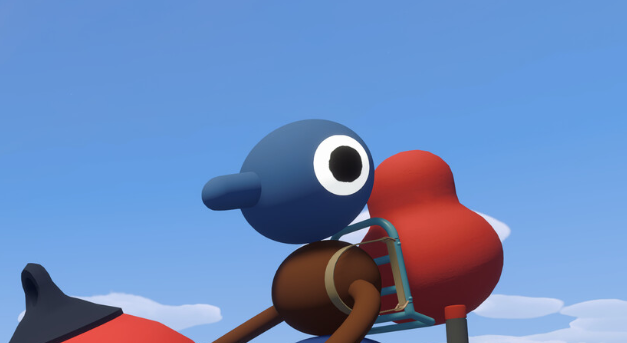
The backpack in Big Walk gives you another place to carry an item, but it does not work like a normal inventory menu. You cannot equip it yourself, place something into your own backpack, or reach behind your character and take the stored item back out.
Another player has to manage the backpack for you, which makes it useful when the group understands who is carrying what, but fairly useless when everyone runs away before helping each other load their equipment.
Jump To Section:
How to Use the Backpack
Where to Find a Backpack
What to Store in It
Backpacks and Dropped Items
What Happens Between Sessions
How to Unlock Big Pack
Backpack Not Working
How to Use the Backpack in Big Walk
Have another player pick up the backpack and attach it to the storage point on your back. Once it is equipped, that player can place a carryable item into it while you continue holding something else in your hands.
The normal process is:
- Find a backpack inside one of the blue circular buildings.
- Have a friend pick it up.
- Stand near them while they attach it to your back.
- Give that player the item you want stored.
- Have them place the item into the backpack.
- Ask another player to remove it when you need it again.
You cannot interact with the storage position on your own back. Even if you are the one wearing it, someone else must put the item away and retrieve it later.
The backpack normally adds one extra carrying position rather than opening a large inventory with several slots. Your character can therefore hold one item in their hands while another remains secured on their back.
This is still a major improvement because Big Walk constantly asks the group to choose between tools, communication equipment, and puzzle objects. The backpack does not remove those decisions, but it gives one player enough room to carry an important item without abandoning whatever they were already using.
Where to Find a Backpack in Big Walk
Backpacks are found inside the large blue circular structures scattered around the island. These buildings have an open, rounded design with a short ramp leading inside, making them fairly easy to recognize once you know what they contain.
There are several backpacks available rather than one for the entire group. Each blue structure may contain a backpack, waist bag, or another piece of carrying equipment, so continue checking them as you explore.
One early backpack can be found around the Red Tower region. From the higher ground near the tower, look downhill for the distinctive blue circular building and head inside.
You do not need to complete the Red Tower before wearing the backpack. The tower is simply a useful landmark for finding one of the earlier locations.
Larger groups will need to visit more of these buildings if several players want their own storage. Finding one backpack does not automatically give a copy to everyone in the session.
What Should You Put in the Backpack?
I would use the backpack for something important that you need to transport but do not expect to use every few seconds. Anything stored behind you becomes dependent on another player, so putting your most frequently used tool there can become annoying very quickly.
Good backpack items include:
- Puzzle rewards being carried back to a tower.
- A map or compass that the group only checks occasionally.
- A flashlight during daylight travel.
- A spare communication tool.
- A small item that would be difficult to find after dropping it.
A walkie-talkie creates an unusual exception. You can still hear incoming communication while the device is attached to your back, but you cannot speak through it until another player removes it and puts it back into your hands.
That setup works for someone who mostly needs to follow directions while carrying another object. It works much worse for the person trying to coordinate the entire group, as they may hear everyone asking questions without being able to answer.
Puzzle rewards are usually a strong choice because the group may need to move several of them over a long distance. A backpack lets one person carry a reward without giving up the tool or second object already in their hands.
The person wearing the backpack should also tell everyone what is inside it. Once several players have different colored bags, radios, tools, and rewards attached to them, it becomes surprisingly easy to forget who is carrying the item the group actually needs.
Does the Backpack Stop You From Dropping Items?
An item stored in your backpack remains attached when your character falls. This makes the backpack safer than carrying something loose in your hands while climbing a steep hill or jumping across uneven terrain.
Big Walk does not have normal fall damage, but a bad tumble can stun your character and cause the item in your hands to drop. Small tools can then roll down a slope or disappear into the grass before anyone notices.
Items stored on your back or hip remain secured, so consider packing away anything that would be difficult to replace or locate before attempting a risky climb.
The tradeoff is that you need a friend nearby to retrieve it afterward. Do not secure the group’s flashlight inside your backpack and then enter a dark tunnel alone, as knowing exactly where the flashlight is will not help when you cannot reach it.
What Happens to the Backpack When You Leave?
The backpack and any portable equipment carried by the group are preserved when the host ends the session. When the same save is loaded again, the items are returned through the Lost & Found near the starting area.
They may not automatically appear on the same players who wore them previously. Check the beige Lost & Found platform near the spawn area and collect the backpack again before continuing your trip.
Our Big Walk save guide explains how the host reloads the world and where carried items appear between sessions.
Because the group may return to a pile of equipment, it helps to decide who needs each backpack before everyone starts grabbing things. Otherwise, the person who carried the map and communication equipment during the previous session may end up with nothing while someone else quietly leaves wearing two useful items.
How to Unlock the Big Pack Achievement
Big Pack requires your character to wear a backpack.
Finding one is not enough. Another player needs to pick it up and attach it to your back before the achievement or trophy registers.
You do not need to store an item inside it first. Wearing the backpack completes the requirement, although you may as well use the extra carrying position once it is equipped.
When several players want Big Pack, pass the backpack between them and have one person equip it on each character. There are additional backpacks elsewhere on the island, but the group does not need to find a unique one for every achievement attempt.
Our Big Walk trophy and achievement guide covers Big Pack along with the transportation, exploration, and ending requirements needed for full completion.
Why Can’t I Use My Backpack?
The backpack is probably working as intended if you can see it on your character but cannot interact with it yourself. Big Walk does not let players manage equipment attached to their own back.
Ask another player to:
- Attach the backpack if you are not wearing it yet.
- Place the item into the storage position.
- Remove the stored item when you need it.
- Take off the backpack if another player needs to wear it.
If the backpack disappeared after loading your save, check the Lost & Found near the starting area. If you dropped it during the same session before anyone equipped it, return to the blue building or area where it was last left.
Big Walk turns inventory management into another cooperative interaction rather than giving every player a private menu. The backpack lets you carry more, but only when your friends stay close enough to help you use it.