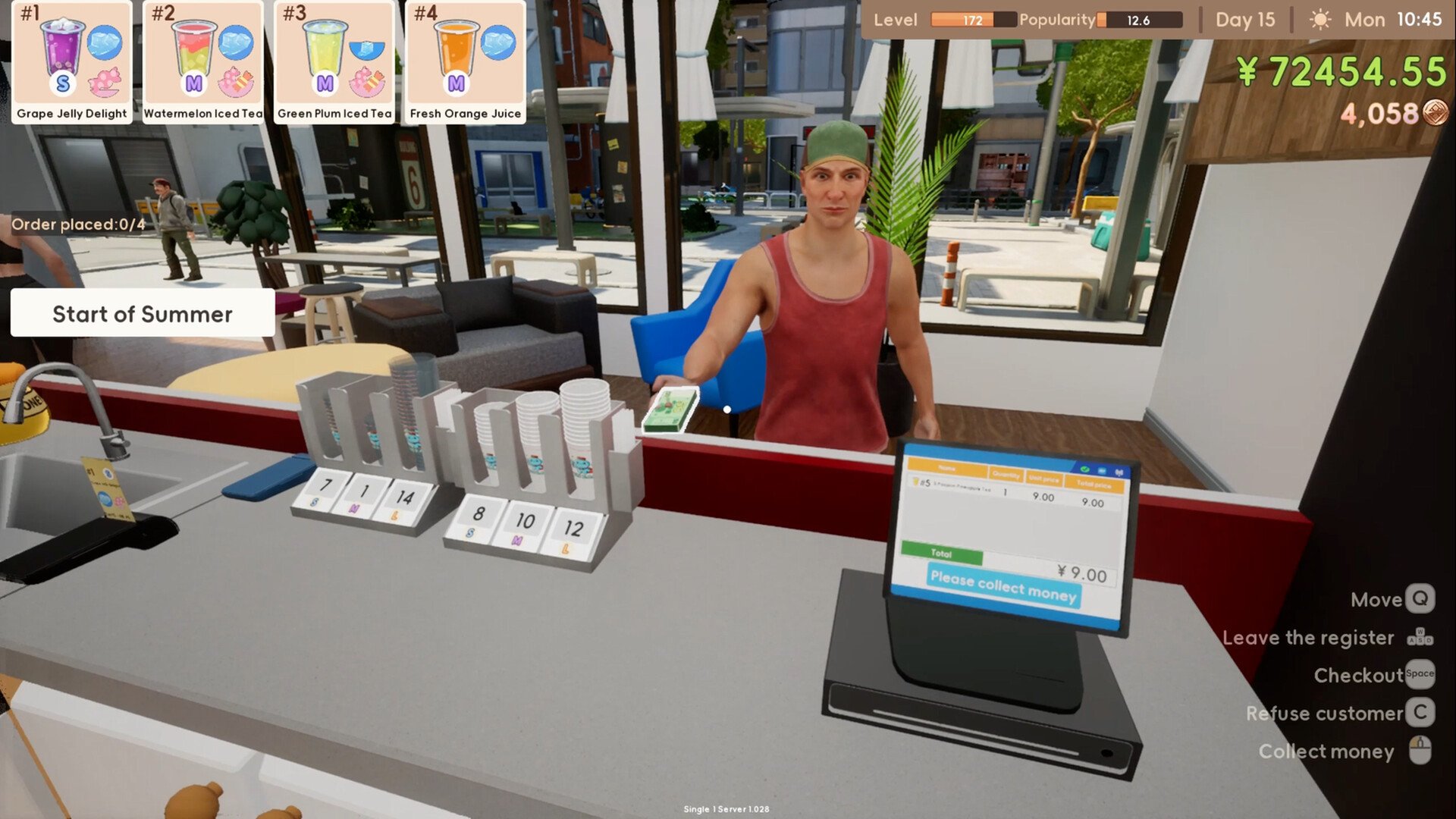
Boba Cafe Simulator begins with a small counter and a simple lemonade recipe, but the workload expands quickly once coffee, milk tea, boba, fruit drinks, deliveries, bills, friendships, and shop upgrades enter the picture. The key to running the cafe efficiently is preparing slow ingredients before opening, organizing orders by shared steps, and refusing to add more recipes than your current counter can handle. A smaller menu served consistently will build popularity faster than a large menu filled with late or incomplete drinks.
Jump To
Prices, Popularity, and Profit
Exploration and Free Ingredients
Best Way to Start Boba Cafe Simulator
Start on Normal difficulty with the tutorial enabled while learning how orders, recipes, cup sizes, temperature, sugar, ice, and finishing items work. Higher customer volume may create more sales opportunities, but it also gives you less time to understand why a drink was rejected or failed to receive a Perfect rating.
After naming the shop and selecting its sign design, organize the supplied cups before opening. Place the appropriate cup boxes in the organizer, keep the label printer accessible, and identify where the sugar, ice, purified water, sealer, lids, and straws are located.
Your first drinks are simple enough to make one at a time. Use these early lemonade orders to learn the complete service loop: accept payment, take the correct cup, attach the printed label, prepare the recipe, match the requested customization, finish the cup correctly, and press E at the serving counter.
Do not immediately spend the starting money on every visible appliance. Several recipes and systems unlock through tutorial progress, and buying equipment too early can leave you short on ingredients, cups, sugar, straws, or other supplies required to fulfill active orders.
The early objective is not building the largest possible menu. It is reaching a point where lemonade and coffee can be made consistently, supplies can be replaced without panic, and the counter remains organized when several customers arrive together.
Prepare the Cafe Before Opening Each Day
The most important work often happens while the shop is closed. Time does not need to be spent serving customers while you are still arranging ingredients, discarding spoiled products, or discovering that the wide-straw holder is empty.
Begin each morning by checking prepared tea, coffee, fruit, milk, sugar syrup, ice, cups, lids, sealing supplies, thin straws, and wide straws. Restock anything that is close to empty rather than waiting for the final serving to disappear during an order.
Discard spoiled drinks and ingredients before they are mixed into a new cup. Prepared products can remain usable across days, but the visible spoilage timer should determine how aggressively you batch them.
Cook pearls and brew tea before opening whenever boba is listed. Grind coffee in advance, prepare fruit that appears frequently on the current menu, and place delivery bags near the separate delivery station once takeout has been unlocked.
Review the active recipes on the phone before opening. A recipe that has been unlocked but not listed cannot be ordered, while leaving a complicated drink active without the necessary stock creates avoidable delays.
Only turn on lights and machinery when they are useful. Both contribute to operating expenses, so leaving every device active throughout a quiet period reduces the benefit of the additional sales.
Use Labels to Keep Every Order Separate
Attach the printed label to the cup before adding ingredients. The label displays the information that changes from customer to customer, including size, temperature, sugar, and ice.
This matters even when several people order the same drink. Three lemonade orders may require different ice and sweetness levels, so treating them as identical can produce one correct drink and two failures.
Keep cups physically arranged in order from left to right. Place the oldest active order closest to the preparation station or serving counter, then add newer cups behind it.
Do not accept an unlimited number of payments simply because customers are waiting. Every accepted order becomes another cup that must be tracked, and unfinished orders can lead to refunds and reduced popularity when the day ends.
When the counter becomes crowded, stop accepting new customers long enough to clear the oldest orders. A shorter queue of correctly labeled drinks is easier to recover than a counter filled with unidentified cups.
How to Make Perfect Drinks
A Perfect drink must match the base recipe, customer customizations, cup type, temperature, lid or sealing method, and straw requirement. Leaving out one finishing item can prevent a drink from earning the Perfect rating even when the liquid itself is correct.
Read the recipe through the phone and use the label for the customer-specific changes. The recipe explains what creates the drink, while the label tells you how that individual wants it served.
Match the sugar and ice indicators exactly. The wall reference explains how many interactions correspond to the available levels, so do not estimate by appearance once the cafe becomes busy.
Cold drinks generally use sealing film, while hot drinks require the appropriate paper cup and lid. Drinks containing large toppings need a wide straw, while simpler cold beverages use the thin option.
Keep both straw types stocked in the cup organizer. When the drink is correct and the required supply is available, the appropriate straw can be attached automatically.
Press E while inspecting a completed drink when something appears wrong. The game can display a small message identifying a missing or incorrect component, making it faster to repair the cup than remake it blindly.
Perfect drinks provide a popularity bonus, so accuracy influences more than the current payment. A slightly slower Perfect order may contribute more to long-term growth than several rushed drinks with missing lids or incorrect ratios.
How to Make Boba Tea in Boba Cafe Simulator
To make boba tea, you need cooked pearls, prepared green tea, milk, a topping bowl, the correct cup, and wide straws. The pearls and tea must be prepared separately before the final drink can be assembled.
Purchase pearls and place a serving in the cooking pot. Fill the pot with water, place it on the induction cooker, turn it on, and wait for the pearls to finish cooking.
Carry the finished pot to the topping bowl and click it while holding the pot. This transfers the cooked pearls into the topping station. Raw pearls cannot be added directly from the bag to a customer’s drink.
Prepare green tea by refilling the pot with water, adding a serving of tea, and boiling it on the induction cooker. Transfer the completed tea into the beverage dispenser.
When a boba order arrives, take the correct cup and attach its label. Fill the cup to 50% with green tea, then use milk to complete the other half of the drink.
Milk can be easier to control as the first half because it fills in a fixed portion, while the dispenser continues until manually stopped. Regardless of order, the finished ratio should remain approximately half milk and half green tea.
Click the topping bowl once while holding the cup to add one serving of cooked pearls. Complete the requested sugar and ice settings, seal or heat the drink as required, and make sure wide straws are stocked.
The boba recipe must also be listed through the Recipes app before customers can order it. Unlocking or preparing the ingredients alone does not place the drink on the active menu.
How to Make Hot Boba and Other Hot Drinks
A Perfect hot drink requires the correct paper cup and a lid. Using a clear cold-drink cup or finishing the order only with sealing film can cause the drink to fail its final check.
Hot drinks can be prepared through hot water or by using the steam machine. Hold the cup and interact with the appropriate heating station before completing the order.
For hot boba, prepare the same milk, green tea, and cooked pearl combination used by the cold recipe, but use the required hot-drink cup and heat the finished beverage.
Add a lid after the heating step. The presence of pearls still requires a wide straw, so a hot boba order may need both the lid and the correct straw supply.
Process hot drinks separately from cold batches when possible. Moving between ice, sealing film, steaming, and lids makes it easy to apply the finishing method from the previous cup out of habit.
Use the Phone to Control What Customers Can Order
Press B to access the phone and open the Recipes app. This menu shows available recipes, lets you select their cup size, places them on the active menu, and provides access to price adjustments.
A newly unlocked drink does not automatically become available to customers. You must list it before orders begin appearing.
This delay can be useful. Prepare the ingredients, buy the correct cups, and stock the required straws before activating a complicated recipe.
Keep a manageable selection during the opening days. Lemonade and coffee use different stations but remain relatively simple, while boba adds boiling, tea preparation, milk ratios, toppings, and wide straws.
Fruit drinks add additional cutting or juicing work. Fresh orange juice uses four orange wedges with purified water and a thin straw, while watermelon juice requires its own prepared fruit supply and serving setup.
Expanding the menu should follow counter capacity. Add another recipe when the current drinks can be served without running out of shared supplies such as sugar, cups, or ice.
Batch Shared Steps Without Mixing Customer Customizations
Multiple orders can be prepared faster by grouping their common steps. Several lemonades can be labeled, lined up, filled with three lemon slices each, and then moved through the water station together.
Fruit can also be cut in larger groups before being distributed to individual cups. This reduces the repeated movement between the crate and cutting board.
Coffee powder, green tea, and cooked boba should be prepared as stocked ingredients rather than remade for every single customer. These are the slowest parts of their respective recipes and create the largest delays when handled reactively.
The customization stage should remain individual. Read each label before adding sugar, ice, heat, lids, or straws.
Never rely on remembering that “the second cup wanted full sugar.” Keep the labels visible and finish the drinks in a consistent physical order.
Batching works best with two to four related orders. Accepting a full line and trying to prepare everything simultaneously creates more tracking work than the saved movement is worth.
Restock Before the Final Serving Runs Out
Sugar, milk, lemons, coffee, cups, and straws can disappear faster than expected once several recipes share them. Check visible remaining quantities whenever the queue briefly clears.
Milk deserves particular attention after boba is unlocked because every order consumes a substantial portion of the cup. Several consecutive boba customers can empty a carton quickly.
Thin straws support multiple simpler drinks, while wide straws are essential for boba and other drinks with large toppings. Running out of either can prevent a finished cup from receiving a Perfect score.
Ingredients can be purchased directly from the nearby store or ordered through the phone. Buying locally avoids the delivery fee, while phone orders may save time when leaving the counter would disrupt active service.
Do not overbuy prepared ingredients simply because they can be stored. Several products spoil after a limited number of days, and old coffee or juice may need to be discarded before the investment is recovered.
Stock durable consumables more aggressively than perishable drinks. Cups, lids, straws, sugar syrup, and unused packaged ingredients are safer reserves than several days’ worth of finished coffee.
Keep Prices Inside the Customer Happiness Range
Open the recipe pricing screen through the phone to adjust what each drink costs. The interface shows how the selected price affects customer happiness.
The best early strategy is to raise prices within the range that still shows customers as happy. This improves revenue without sacrificing the popularity needed to attract and retain business.
Do not assume the maximum possible price produces the greatest overall profit. A higher margin per cup can be offset by weaker demand, poorer reactions, or slower popularity growth.
Different recipes also have different costs and preparation burdens. Boba uses tea, milk, pearls, sugar, ice, a larger cup, and a wide straw, so its price should account for more than the time required to hand the cup across the counter.
Review pricing after ingredient costs, delivery commissions, rent, or other operating expenses begin affecting the daily report. A price that worked during the lemonade tutorial may not support a larger cafe.
Use the end-of-day screen to compare gross sales, refunds, delivery fees, and other expenses rather than judging success only by the amount of cash collected at the register.
Build the Counter Around the Order of Preparation
A good cafe layout reduces how often you cross the same room. Keep cups, labels, base ingredients, customization stations, finishing supplies, and the serving area arranged in the order they are normally used.
The boba station should keep the pot, induction cooker, tea dispenser, milk, topping bowl, sugar, ice, sealer, and wide straws within a short loop.
Coffee works best when the beans, grinder, coffee machine, paper cups, sugar, and lids are grouped together. Fruit drinks should have their crates near the cutting board or juicer.
Use Q to enter move mode for furniture. Items can snap to walls and be rotated with the mouse wheel, allowing the cramped starting space to be reorganized without immediately purchasing an expansion.
Avoid placing large boxes in front of ingredient stations or using valuable counter space for empty packaging. Move recycling, unopened stock, and delivery equipment away from the primary drink line.
Create a separate delivery corner after takeout becomes active. Mixing delivery labels and bags with the normal pickup printer increases the chance of attaching the wrong order information.
How Deliveries Work
The delivery system becomes especially useful when rain or other weather reduces walk-in traffic. Customers may remain home during poor conditions, making takeout another way to keep sales moving.
The first delivery introduction provides takeout bags and asks you to prepare a drink for a numbered building. Place the completed beverage inside a bag, locate the destination through the map, and leave it at the building’s delivery rack.
To open the larger delivery system, use the Takeout app and sign a contract with an available platform. Contracts can differ in duration, commission, subsidies, and other terms.
After signing, purchase a dedicated delivery label printer. The delivery interface can then begin displaying orders when the shop is operating.
Accepted delivery orders can eventually be delivered personally or assigned to a courier. Hiring a courier becomes more practical once counter service is busy enough that leaving the shop costs more than the delivery fee.
Do not enable automatic acceptance immediately. Manual control prevents the cafe from accumulating delivery orders while walk-in customers already occupy every preparation station.
Keep delivery bags and the delivery printer together. Finish the drink, attach the correct delivery information, bag it, and move it to the outgoing area without passing through the normal customer pickup cups.
Sell Empty Boxes and Bottles Instead of Leaving Them on the Floor
Purchased supplies leave behind packaging that can quickly clutter the cafe. Empty boxes and bottles are not necessarily worthless trash.
A nearby NPC accepts unwanted cardboard boxes and bottles for recycling. Gather the discarded packaging and sell it rather than allowing it to occupy preparation space.
Use a separate bucket or corner as temporary recycling storage. This keeps the working floor clear while letting you make one larger trip instead of carrying every empty box outside immediately.
Confirm that a container is truly empty before recycling it. Throwing away an unopened ingredient shipment to clear space creates a much larger loss than the recycling payment can recover.
Recycling is supplemental income rather than the main business. Clear packaging when the shop is closed or quiet instead of abandoning active customers for a small sale.
Explore the Town While the Shop Is Closed
Boba Cafe Simulator extends beyond the cafe interior. The surrounding town contains shops, delivery destinations, NPCs, collectible ingredients, a museum system, relationship progression, and additional activities that open as the game develops.
Use the map to locate numbered buildings, undiscovered points, stores, and characters. Question marks are worth investigating between workdays rather than during an active queue.
Some ingredients can be collected directly from the environment. Bushes and plants may provide peaches, passion fruit, pineapple, lemons, mint, avocado, grapes, and other produce.
Free ingredients can reduce purchasing costs and may support future recipes, gifts, or collection goals. Gather them while already exploring instead of making a dedicated trip for one common lemon.
The town also contains optional distractions such as the boba lottery and unusual vendors. Treat these as entertainment after rent, ingredients, and essential equipment have been covered.
Fishing, museum collection, farming, additional buildings, and other systems appear to be tied to further progression. Follow missions and relationships instead of assuming every activity is available from the first day.
Give NPCs Drinks to Build Friendship
NPC relationships increase by chatting and giving drinks. Gifts can be offered once per character per day, so repeated attempts on the same day do not provide unlimited affection.
Different characters have favorite and disliked drinks. The Social app tracks discovered preferences and shows additional information as you experiment.
Begin with inexpensive drinks while learning preferences. Giving a complex boba order to someone who dislikes it wastes more ingredients than testing lemonade, coffee, milk, or another simple option.
Pay attention to dialogue after the gift. A neutral response may still provide a small increase, while a strongly positive reaction suggests the drink belongs among that NPC’s favorites.
Mimi the cat responds positively to plain milk, demonstrating that gifts do not always need to be official menu recipes. Experiment with ingredients when the character’s theme suggests an obvious preference.
Make gifts before opening or after closing. Leaving customers waiting while you carry drinks around town can produce refunds and popularity losses that outweigh the relationship gain.
Friendship appears to connect with broader world progression, so relationships are not merely decorative. Building affinity may reveal additional character information, rewards, or systems as the save continues.
Pay Bills Before Spending on Expansion
The cafe has operating expenses, including rent and electricity. Open the Bills app regularly rather than discovering an unpaid balance only when attempting to expand.
Machinery and lighting consume power. Turn on lights when darkness makes the shop difficult to operate, but do not leave unnecessary equipment active purely because it is available.
Expansion provides additional room for counters, dining tables, delivery equipment, and future machinery, but the first expansion may add less space than expected. Improve the current arrangement before assuming a larger floor solves inefficient movement.
Pay outstanding rent before purchasing cosmetic furniture or optional systems. An attractive cafe cannot operate without ingredients, utilities, and access to its space.
Dining furniture can create another type of customer experience as the cafe develops, but production equipment should receive priority while orders are still delayed by missing stations or cramped preparation routes.
The phone also includes a staff section, indicating that employee management becomes part of the larger business. Avoid buying a larger space purely in anticipation of staff until the current shop consistently earns enough to cover wages and overhead.
Common Boba Cafe Simulator Beginner Mistakes
The most damaging early mistake is opening before preparation is complete. Cooking pearls, brewing tea, grinding coffee, organizing cups, and restocking straws are much easier without a line of waiting customers.
Another mistake is forgetting to list newly unlocked recipes. Owning the ingredients does not make the drink available until it has been activated through the phone.
Players also overfill the green tea portion of boba. Stop the dispenser at 50% or add milk first to make the equal ratio easier to control.
Missing straws, lids, or sealing film is another frequent cause of imperfect drinks. These finishing supplies deserve the same attention as the recipe ingredients.
Accepting too many orders at once creates label confusion and unfinished drinks. Batch a manageable group, serve them, and then return to the register.
Do not end the day while customers or accepted orders remain unresolved. Unfinished orders create refunds and reduce popularity on the following day.
Overpricing every recipe can also slow growth. Keep prices within the positive customer-response range until popularity and demand are strong enough to justify further testing.
Finally, do not ignore the town. Recycling, free fruit, deliveries, relationships, collection systems, and future activities all contribute to progression beyond simply standing behind the register.
A Strong Cafe Is Built Before the Doors Open
The most reliable Boba Cafe Simulator strategy is to separate preparation from customization. Brew tea, cook pearls, grind coffee, cut common fruit, restock supplies, and organize the counter before opening.
Once customers arrive, use labels to track each cup, group only the shared recipe steps, and finish sugar, ice, temperature, lids, seals, and straws individually. Inspect any failed drink before discarding it.
Keep the menu small enough for the current equipment, set prices within the happiness range, and check bills and inventory before purchasing expansions. Add delivery orders only when the normal counter is under control.
After closing, recycle packaging, explore the town, collect free ingredients, and give one thoughtful drink to each NPC you are trying to befriend. That rhythm keeps the business profitable while steadily opening the larger world around the cafe.