Blinding Flash is one of those skills the game tells you about once then expects you to remember forever. If it feels like it is not working, it is usually because the timing and inputs are very specific.
How To Use Blinding Flash In Crimson Desert
To use Blinding Flash, you must enter the stance first, then refocus the input again to activate the light.
It is a two step input, not a single press.
Blinding Flash Controls Explained
This is where most players get stuck.
PC Controls
Hold CTRL and left mouse button at the same time
Release CTRL
Press and hold CTRL again to focus the light
If you do not re press CTRL, nothing happens.
Controller Controls
Hold RB and LB together (R1/L1)
Release one button
Press and hold it again to focus
Controller is much smoother for this ability.
How To Use Blinding Flash On The Door Puzzle
You first use this ability early in the game.
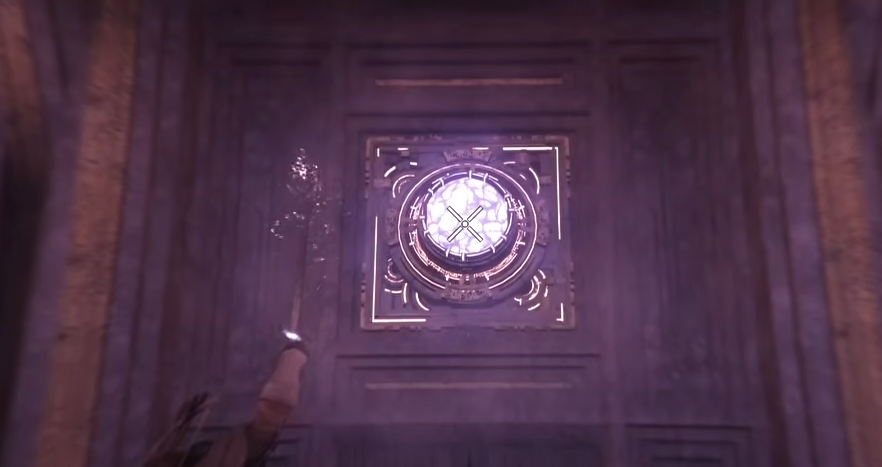
Find the crystal above the sealed door
Enter Blinding Flash stance
Focus the light onto the crystal
Hold it steady until it activates
If the door does not open, you are not holding the focus long enough.
What Blinding Flash Is Used For
It is not just a puzzle tool.
Opens sealed doors
Activates certain objects
Stuns enemies briefly
Can be used in boss fights
It is more useful than it first seems.
Why Blinding Flash Feels Hard To Use
There are a few reasons players struggle with it.
Requires two separate inputs
Timing is not explained clearly
Mouse and keyboard feels clunky
No clear feedback when you fail
Once you understand the sequence, it becomes consistent.
Tips To Make It Easier
Use a controller if possible
Focus on the timing, not speed
Make sure you re press the input to activate
Keep your aim steady when focusing
Rushing the input is the most common mistake.
Final Blurb
Blinding Flash is simple once you understand the two step input, enter the stance, then focus the light. It is used in puzzles and combat, so learning it early saves a lot of frustration later.
FAQ
How do you use Blinding Flash in Crimson Desert
Enter the stance, then press the input again to focus the light.
Why is Blinding Flash not working
You likely did not perform the second input to activate the ability.
What is Blinding Flash used for
It is used for puzzles, opening doors, and stunning enemies.
Is Blinding Flash easier on controller
Yes, controller inputs are more consistent than keyboard.
Where do you first use Blinding Flash
At a sealed door with a crystal early in the story.