How to Use Red Bricks in LEGO Batman Legacy Of The Dark Knight

Red Bricks in LEGO Batman: Legacy of the Dark Knight are used for cosmetic color palettes and visual effects, not classic LEGO cheat modifiers. The option is tucked inside the character and vehicle customization menus, so the menu path matters more than the Red Brick itself once it has been unlocked.
For more Gotham collectibles, suits, traversal help, vehicles, and mission coverage, check the main LEGO Batman: Legacy of the Dark Knight guide hub.
Jump To
How To Use Red Bricks In LEGO Batman Legacy Of The Dark Knight
To use Red Bricks in LEGO Batman: Legacy of the Dark Knight, open the map with Options, press R1 or RB to reach the Characters menu, choose Suits with Square or X or Vehicles with Triangle or Y, then press Square or X again to open the Red Brick selection.
That final Red Brick selection menu is where unlocked Red Bricks can be applied. The game does not treat them like old LEGO cheat toggles, so collecting or buying a Red Brick does not automatically turn on a gameplay bonus. It unlocks a style option that still has to be equipped through customization.
This is the main reason the system feels easy to miss. A lot of LEGO players are trained to look for an Extras menu or a cheat toggle screen. Legacy of the Dark Knight puts Red Bricks inside the same broader customization flow used for characters and vehicles instead.
I would check the Red Brick menu right after unlocking a new one, especially after mission collectibles or Bat-Mite Shop purchases. It is easy to collect a Red Brick, forget it exists, and then wonder why Batman still looks like he refused to touch the color settings on principle.
Red Brick Menu Path And Controls
The Red Brick menu path starts from the map, then moves into Characters, then into Suits or Vehicles depending on what needs the cosmetic effect.
The control sequence is short, but the second Square or X press is the easy step to miss. The first Square or X opens Suits. The second Square or X opens the Red Brick selection from there. For vehicles, Triangle or Y opens the Vehicles menu first, then Square or X opens the Red Brick selection.
| Step | Input | What It Opens |
|---|---|---|
| 1 | Press Options | Opens the map. |
| 2 | Press R1 or RB | Moves to the Characters menu. |
| 3 | Press Square or X | Opens Suits customization. |
| 4 | Press Triangle or Y | Opens Vehicles customization instead. |
| 5 | Press Square or X again | Opens the Red Brick selection. |
The clean way to remember it is map, Characters, Suits or Vehicles, then Red Bricks. If the Red Brick option still feels hidden, the wrong category is probably open.
If the goal is changing the actual outfit before applying a Red Brick palette, the LEGO Batman how to change suits guide covers the suit menu path separately.
What Red Bricks Do In LEGO Batman Legacy Of The Dark Knight
Red Bricks in LEGO Batman: Legacy of the Dark Knight unlock cosmetic color palettes and special visual effects for outfits and vehicles.
They do not add classic gameplay cheats like huge Stud multipliers or combat breaking bonuses. That is the biggest change from older LEGO games. Red Bricks still count as collectibles and customization rewards, but their actual use is visual.
This makes them more similar to palette unlocks than power modifiers. A Red Brick can change the look of a character’s outfit or vehicle, but it will not make missions easier, increase damage, or replace normal upgrades and collectibles.
| Red Brick Function | How It Works |
|---|---|
| Character customization | Applies cosmetic palettes or visual effects to suits. |
| Vehicle customization | Applies cosmetic palettes or visual effects to vehicles. |
| Classic cheat effects | Red Bricks do not work that way in this game. |
| Completion value | They still matter for collectible cleanup and full collection progress. |
The best way to treat Red Bricks is as style rewards. They are still worth collecting, but the payoff is customization rather than raw power. The old Stud multiplier dream is dead here. Gotham mourns quietly.
How Red Bricks Work For Suits And Vehicles
Red Bricks can be used on both suits and vehicles, but the customization menu is split between those 2 categories.
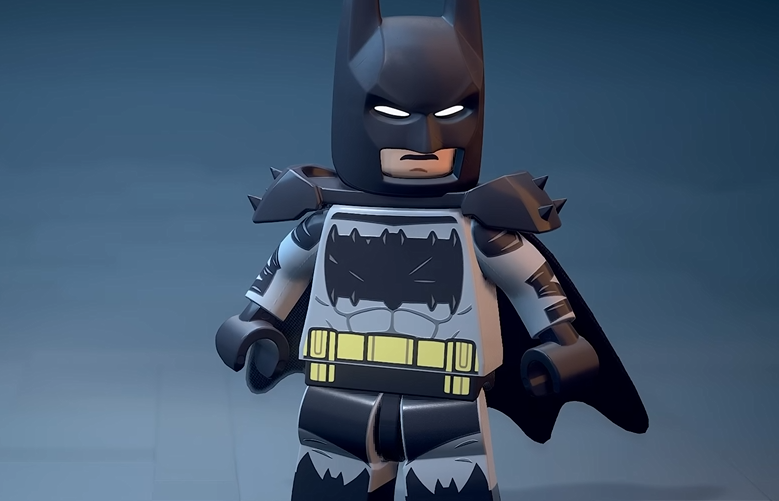
For character outfits, go into the Suits menu and open the Red Brick selection from there. For vehicles, go into the Vehicles menu first, then open the Red Brick selection. This separation is why the system can seem broken when the wrong menu is open.
| What To Customize | Menu Route |
|---|---|
| Suits | Options, Characters, Suits, Red Brick selection. |
| Vehicles | Options, Characters, Vehicles, Red Brick selection. |
Suit changing and Red Brick effects are connected, but they are not the same thing. The suit decides the outfit, while the Red Brick changes the cosmetic palette or effect applied through the Red Brick menu. For the full outfit list, the LEGO Batman all suits list covers every major suit unlock in one place.
Why Red Bricks Are Not Working
If Red Bricks are not working in LEGO Batman: Legacy of the Dark Knight, they are probably not being equipped from the Red Brick selection menu or the wrong customization category is open.
Collecting a Red Brick does not automatically apply it. Buying one from Bat-Mite’s Shop also does not mean the effect immediately appears on every suit or vehicle. The Red Brick has to be selected manually from the proper menu.
The other common issue is expecting cheats. Red Bricks are not gameplay modifiers in this game, so nothing like a Stud multiplier will appear after equipping one. Look for color, palette, and visual changes instead.
| Problem | What To Do |
|---|---|
| Red Brick does not activate | Open the Red Brick selection menu and equip it manually. |
| No cheat effect appears | Red Bricks are cosmetic in this game, not classic cheats. |
| Cannot find suit effects | Open Suits, then Red Brick selection. |
| Cannot find vehicle effects | Open Vehicles, then Red Brick selection. |
| New Red Brick seems missing | Check the correct customization category after unlocking or buying it. |
The menu is the whole trick. Once the right Red Brick selection is open, the system makes more sense. It is just buried one layer deeper than most players expect.
Best Time To Use Red Bricks
The best time to use Red Bricks is after collecting mission Red Bricks, buying Red Bricks from Bat-Mite’s Shop, changing suits, or customizing vehicles during open world cleanup.
Since Red Bricks are cosmetic, there is no combat reason to save them or equip them in a specific order. Use whichever palette or effect looks best with the current suit or vehicle. The real value is making the Bat Family and Gotham vehicles look different while moving through the city.
Bat-Mite’s Shop also sells several Red Bricks through a rotating front podium selection, so it is worth checking the shop when spare Studs are available. Some Red Bricks are found in missions, while others are purchased, which means both mission replay and shop checks matter for full Red Brick collection.
For mission based Red Bricks or missed collectibles, the LEGO Batman mission replay guide explains how to replay completed missions through the Batcomputer.
Final Blurb
Red Bricks in LEGO Batman: Legacy of the Dark Knight are used from the customization menus. Open the map with Options, go to Characters with R1 or RB, choose Suits or Vehicles, then press Square or X again to open the Red Brick selection.
The important part is knowing that Red Bricks are cosmetic this time. They change color palettes and visual effects for outfits and vehicles, but they do not act like old LEGO cheat modifiers. It is less powerful than a giant Stud multiplier, but it does give Gotham more style, which is probably the closest Batman gets to admitting customization is fun.