

Little Nightmares 3 How to Use Friend Pass
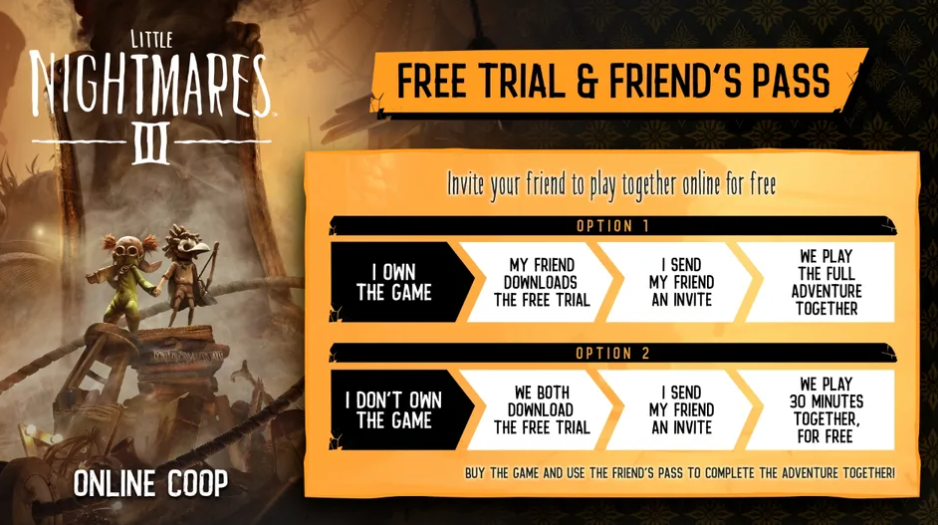
The Friends Pass lets one player invite another to join Little Nightmares 3 for free. It’s the easiest way to play co op without both people buying the game, and setup only takes a few minutes.
How the Friends Pass Works
The Friends Pass gives access to the full co op story for two players on the same platform. One person owns the main game, and the other installs the free Friends Pass version from the digital store. Both versions connect together online so you can explore The Nowhere side by side.
Each player still needs a stable internet connection and their own account on the same platform. Progress saves for both players, and the invited player can return anytime as long as the host starts a new session.
How to Use the Friends Pass
Starting a session with the Friends Pass is simple once both players are ready.
The host opens Little Nightmares 3 and selects the multiplayer option from the main menu
Wait for the “attempting to create session” message to finish
On the multiplayer screen, press the invite button to open the friend list
Choose your friend who installed the Friends Pass version
Have them accept the invite and join your lobby
Once both are connected, select “Start Game” to begin your shared playthrough
If your friend hasn’t installed the Friends Pass yet, they can find it by searching Little Nightmares 3 Friends Pass on the same platform’s store page.
Platform Details
The Friends Pass only works within the same system. A Steam player can’t invite someone on PlayStation or Xbox, and vice versa. Cross platform play isn’t supported yet.
Local or split screen play also isn’t available, so both players need separate devices connected online.
Troubleshooting
If your friend can’t join or gets the “No License Found” message, try these quick fixes:
Restart both devices and re launch the game
Re create the session from the multiplayer menu
Make sure both players are using the same platform version
Check that your internet connection is stable before inviting again
Final Blurb
The Friends Pass makes it easy to share Little Nightmares 3 with someone new. It’s simple to set up, works for the full story, and keeps both players’ progress. Just remember that it’s online only and limited to one platform. Grab a friend, sync your sessions, and dive into the nightmare together.
FAQ
Can both players earn achievements with the Friends Pass?
Yes, both players earn the same achievements and story progress.
Does the Friends Pass include the full game?
It includes the complete co op experience but only works when connected to a host who owns the main game.
Can the invited player host sessions?
No, only the game owner can host sessions. The Friends Pass version can only join.
© 2025 GamerBlurb. Linking is welcome with credit to GamerBlurb.com. Copying or reproduction without permission is not allowed.
More Little Nightmares 3


