Mina the Hollower: How To Save
Mina the Hollower uses a checkpoint based save system built around burrow holes, the Underlab, and careful Bones management. There is no normal manual save or quick save button, so staying safe comes down to reaching checkpoints, spending Bones at the right time, and using Bonestone before a bad death turns progress into pain.
Jump To
How Saving Works In Mina The Hollower
You save in Mina the Hollower by reaching checkpoint burrows, entering the Underlab, and using those checkpoints as the place Mina returns to after death.
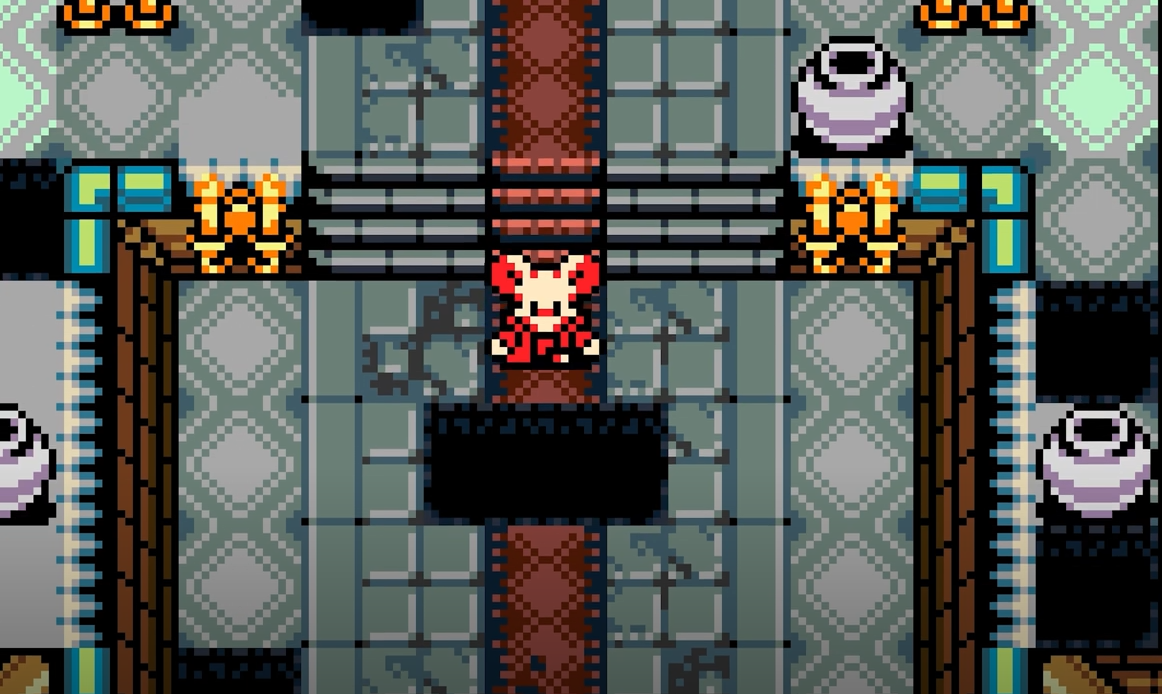
Mina the Hollower does not use a modern save anywhere system. Progress is built around checkpoint points placed through the world. These checkpoints are star shaped holes on the ground, and burrowing into them takes Mina down into the Underlab.
That Underlab visit is the important safety point. Once a checkpoint is reached, death sends Mina back there instead of forcing a full area restart. The game still expects careful play between checkpoints, though. A bad room, a missed dodge, or one stubborn enemy can still send Mina back and put carried Bones at risk.
The clean way to play is to treat each checkpoint as the next real goal. Treasure, upgrades, and side paths are useful, but the checkpoint is what locks in the route. Once that burrow is found, the surrounding area becomes much easier to explore because the reset point is no longer way behind Mina.
How Checkpoint Burrows Work
Checkpoint burrows are star shaped holes in the ground that let Mina enter the Underlab and lock in her current checkpoint progress.
These burrows are the game’s main save points. They are usually easy to spot once the habit forms, but early on they can blend into the floor if the screen is busy. When one appears, burrow into it right away. There is no good reason to leave a new checkpoint untouched while carrying progress through a dangerous area.
The Underlab is also connected to important progression tools, including the Bonestone Sinterer. That makes checkpoint burrows more than a respawn marker. They are the safest place to pause the route, think through upgrades, and decide if Mina should keep pushing or cash out first.
I usually treat a fresh checkpoint as permission to start exploring harder side paths. Before finding one, the smarter move is slower play. After finding one, the route gets more forgiving because the run no longer depends on walking back through every previous room again.
Can You Manual Save Or Quick Save?
Mina the Hollower does not have a manual save or quick save option, so progress depends on checkpoints instead of saving from the pause menu.
This is the part that will feel strict if the game looks like a normal adventure game at first. There is no button that saves before a boss, no quick save before a risky room, and no way to create a custom backup before testing something dangerous.
Quitting the game can let the session continue when returning, but that should not be treated like a full safety net against death. Death is still tied to the last checkpoint. If Mina has not reached the next burrow, dying can send her back and force a repeat of the path.
Because of that, the best save habit is simple. Find the next checkpoint first, then experiment. Pushing deep into a new area with a full pocket of Bones and no burrow found is how the game politely removes confidence from the inventory.
How Bones Loss Works When Mina Dies
When Mina dies, carried Bones are put at risk, but they can be recovered by returning to the last death location and collecting the blue Spark Orb or defeating the enemy connected to that death spot.
Bones are the main progression resource earned from killing enemies. They are used for upgrades through Bone Up, which makes them important for damage, defense, and sidearm progress. Losing them hurts because every failed recovery can delay the next upgrade.
The recovery system gives one chance to get lost Bones back. The problem is the path back can still be dangerous. If the route to the Spark Orb goes through the same enemy setup that killed Mina the first time, a second death can turn a recoverable mistake into a real loss.
The Mina the Hollower how to get Sparks back guide explains Spark recovery in more detail, including enemy held Sparks, hazard deaths, and boss recovery problems.
That changes how Bones should be handled. Carrying a small amount is usually fine. Carrying enough for an upgrade should trigger a different decision. At that point, returning to safety is usually better than gambling on another room just because it is there and looks vaguely manageable. Famous last words, frankly.
How To Save Bones In Mina The Hollower
You save Bones in Mina the Hollower by keeping progress in Bonestone, because Bonestone is stored safely and is not lost when Mina dies.
Bonestone is the safer form of progress. While regular Bones can be put at risk after death, Bonestone stays protected. That makes it one of the best ways to reduce the sting of failed runs, especially while learning enemy patterns and checkpoint spacing.
Bonestone can come from exploration, including Bonestone Dust and Bonestone Flakes found in chests and optional areas. It can also be part of the broader upgrade loop when using Bone Up. The important detail is that Bonestone should usually stay stored until it is needed.
Converting Bonestone too early turns safe progress back into risky Bones. That is the mistake. Bonestone works best as backup currency for upgrades, not as something to dump into the Bone count before walking into a new area full of enemies with rude little hobbies.
How To Use The Bonestone Sinterer
The Bonestone Sinterer is the machine in the top right of the Underlab that converts stored Bonestone materials into Bones.
After reaching a checkpoint burrow, enter the Underlab and head to the Bonestone Sinterer. From there, the machine can convert stored Bonestone material into usable Bones. The switches let Mina pull Bones out of storage when needed.
The best way to use the Bonestone Sinterer is to convert only what is needed for an immediate Bone Up or purchase. If Mina is close to an upgrade, convert enough Bonestone to reach the requirement, spend it, then continue. If Mina is not close to using those Bones, leave the Bonestone stored.
This keeps the safe resource safe. The whole point of Bonestone is that it survives death. Turning all of it into Bones just because the machine is available makes progress easier to lose for no real gain.
Best Save Strategy In Mina The Hollower
The best save strategy in Mina the Hollower is to move from checkpoint to checkpoint, spend Bones before risky routes, and only convert Bonestone when it can be used right away.
This makes the game much smoother because it respects how the save system is built. Mina the Hollower rewards short term caution and long term planning. The goal is not to hoard Bones forever. The goal is to avoid carrying upgrade ready Bones through unknown rooms when a checkpoint or Underlab visit is available.
| Situation | Best Move |
|---|---|
| Found a new checkpoint burrow | Enter it right away and use the Underlab before pushing deeper. |
| Close to Bone Up | Return to safety and spend Bones before taking a bigger risk. |
| Carrying Bonestone | Keep it stored until it can be used for an immediate upgrade or purchase. |
| Died with Bones | Recover the blue Spark Orb, then retreat if the route is still dangerous. |
| Exploring a new area | Prioritize finding the next checkpoint before chasing every side path. |
A steady route usually beats a greedy route. Reaching a checkpoint, clearing nearby rooms, returning to spend, then pushing again may sound slower, but it prevents the worst kind of time loss. Repeating the same hallway 5 times because one upgrade was almost ready is not heroic. It is just paperwork with skeletons.
Weapon upgrades can make future routes safer, but only if the Bones actually make it to the shop. The Mina the Hollower all weapon upgrades guide covers where those Bones are best spent once Mina is ready to upgrade.
Modifiers And Achievements
Mina the Hollower has modifiers that can make movement and combat easier, but enabling them can disable achievements.
The walking speed and burrowing speed modifiers are useful for reducing backtracking. They can make reruns feel faster, especially for players who are still learning checkpoint routes or do not want the classic punishment loop to drag as much.
Combat modifiers can also make Mina stronger or bosses weaker. Those options can help if the difficulty is blocking progress, but they also change the feel of the game more heavily than movement speed does.
For an achievement focused run, leave modifiers off. For a comfort run, they are valid tools. The important part is knowing the tradeoff before turning them on. Mina the Hollower gives the option, but achievements are the price, because apparently even mercy needs paperwork.
Common Save Mistakes To Avoid
The biggest save mistake in Mina the Hollower is looking for a manual save instead of building routes around checkpoint burrows.
The second major mistake is carrying too many Bones through unknown areas. Bones are useful only if they become upgrades. If Mina is close to Bone Up, a safe return is usually better than pushing into another dangerous room for a little extra progress.
Bonestone mistakes are also common. Safe storage only helps if it stays safe. Converting all Bonestone into Bones early makes it vulnerable again, which removes the main reason to use Bonestone in the first place.
| Mistake | Better Play |
|---|---|
| Ignoring checkpoint burrows | Enter every new checkpoint burrow as soon as it is found. |
| Expecting manual save | Use the checkpoint system instead of looking for a menu save. |
| Carrying upgrade ready Bones | Return to the Underlab and Bone Up before taking bigger risks. |
| Converting all Bonestone early | Convert only enough for an immediate upgrade or purchase. |
| Chasing lost Bones recklessly | Recover the Spark Orb carefully, then reset the route if needed. |
| Turning on modifiers without checking achievements | Use modifiers only when the achievement tradeoff is acceptable. |
For more route, combat, saving, and recovery help, the main Mina the Hollower guide hub collects every current GamerBlurb guide for the game in one place.
Final Blurb
Mina the Hollower saves through checkpoint burrows and the Underlab, not through a manual save or quick save button. Reaching each checkpoint is the main way to protect route progress, while smart Bones and Bonestone management protects upgrade progress.
The safest rhythm is to find a checkpoint, enter the Underlab, spend Bones when an upgrade is close, and keep Bonestone stored until it is needed. Once that loop clicks, the save system stops feeling mysterious and starts feeling like the game’s main lesson: greed is expensive, and Mina is very small.