

Image Credit: Two Point Studios, Two Point Museum, Pinstar
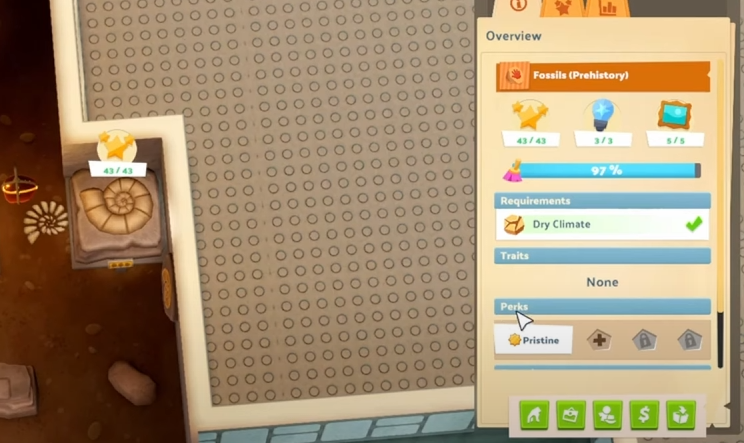
Perks are special upgrades that improve your exhibits, making them more attractive to guests and increasing their effectiveness. If you're struggling to install a perk, here's a simple step-by-step guide to help.
1. Unlock Perks Through Research
Before you can install a perk, you need to unlock it.
Research new perks in the Analysis Room by deconstructing duplicates of exhibits.
Some perks will only become available once an exhibit reaches a certain level of quality.
2. Choose the Right Exhibit
Not every exhibit can have a perk installed.
Some basic fossils or early-game artifacts may not have perk slots available.
Check larger exhibits (like Dinosaur Skeletons) for perk options.
3. Install a Perk
Click on the exhibit you want to upgrade.
Look for the Perks section in the exhibit menu.
If a perk slot is available, click the "+" button to add one.
Choose a perk from the list and confirm.
4. Assign a Janitor (If Needed)
Some perks require a Janitor to install them.
If a perk isn’t installing, make sure a qualified Janitor is available.
5. Consider Waiting for Pristine Exhibits
Perks work best on high-quality exhibits.
If an exhibit is damaged or not fully restored, it might be better to wait before adding perks.
Final Tip
If you don’t see the option to install perks, double-check:
• The exhibit allows perks.
• The perk has been researched.
• A janitor is available (if required).
Now you're ready to boost your exhibits and make your museum even better!
Recommended • View all Two Point Museum


