What the Stars Mean in Deltarune
Written by Aarav Agarwal
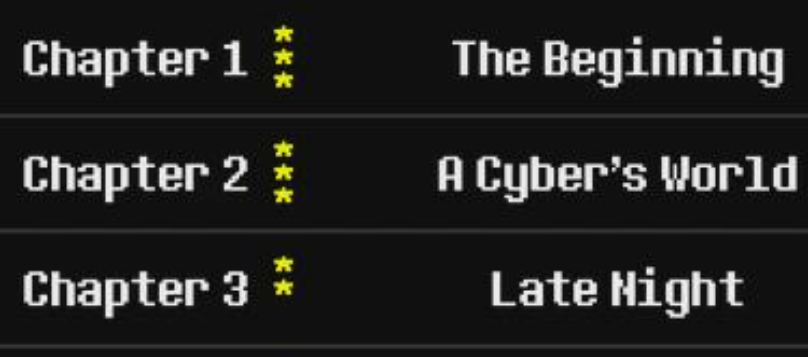
The stars you see on the chapter select screen in Deltarune show which save files have finished that chapter. They don’t represent your score, your route, or how many shadow crystals you’ve hoarded.
Just basic chapter completion per save slot.
Let’s break it down so you’re not staring at the UI like it’s a secret code from Gaster.
What the Stars Actually Track
Stars = Completed Save Files
There are three save slots, and each one can earn a star for a chapter.
A filled star means that save file reached the end of that chapter
A hollow star means the file started the chapter but didn’t finish it
No star means that save slot hasn’t touched the chapter at all
So if you copied a completed save file into Slot 2, you'll see another star... even if you didn’t replay it. That’s why some players have two or even three stars for one chapter.
Why the Grid Exists
That little square grid at the bottom of the screen tracks extras. This includes:
Shadow Crystals, tied to secret boss fights
Possibly eggs or other weird items, depending on the route
Each column represents a chapter
Each row represents a save file
It’s not fully documented yet and we’re still trying to figure it out, but if something feels off or incomplete, it’s likely because one file missed a boss or collectible.
What the Stars Don’t Do
These stars aren’t for “100% completion”.
They don’t care which route you picked.
They just show whether each of the three save files finished a chapter or not.
That’s all.
Final Blurb
The stars in Deltarune aren’t part of some deep secret system... they’re just little checkmarks showing which save files made it to the credits. Hollow stars mean you dipped your toes in, full ones mean you crossed the finish line.
Everything else? That’s tracked in the grid below, or still being figured out by us and the rest of the community hive mind.
FAQ
Q: What do the stars mean in Deltarune’s chapter select screen?
They show which save files have completed that chapter. Each file can earn one star.
Q: What does a hollow star mean?
It means that save file started the chapter but didn’t finish it.
Q: Can I get stars just by copying save files?
Yes, if a copied file has completed a chapter, you’ll see the star show up for it too.
Q: What’s the grid at the bottom right for?
It tracks secret items like shadow crystals, eggs, or optional content per file and chapter.
Q: Do the stars change based on route or performance?
No, stars only care about reaching the end of the chapter, not how you got there.
More DELTARUNE Guides


Latest Gaming Guides and Articles