Mistfall Hunter lets you change your character’s appearance after creation, so you are not permanently stuck with the face, hair, or other cosmetic choices you selected at the beginning of the game.
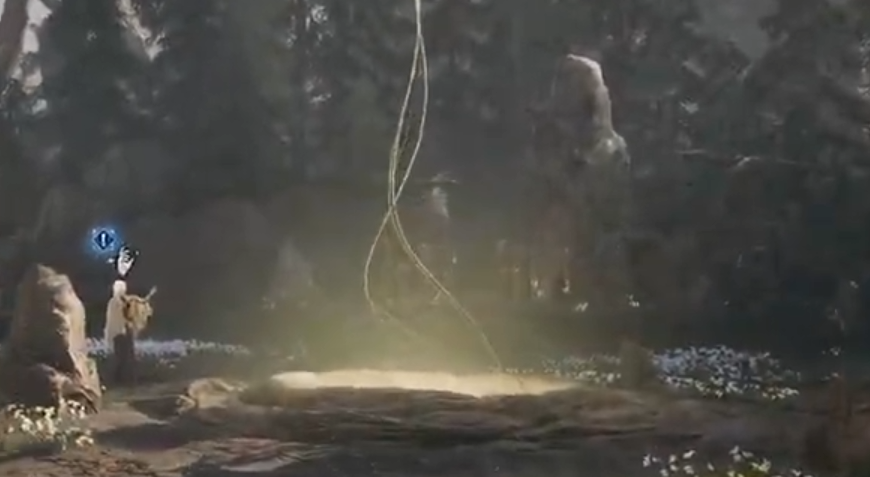
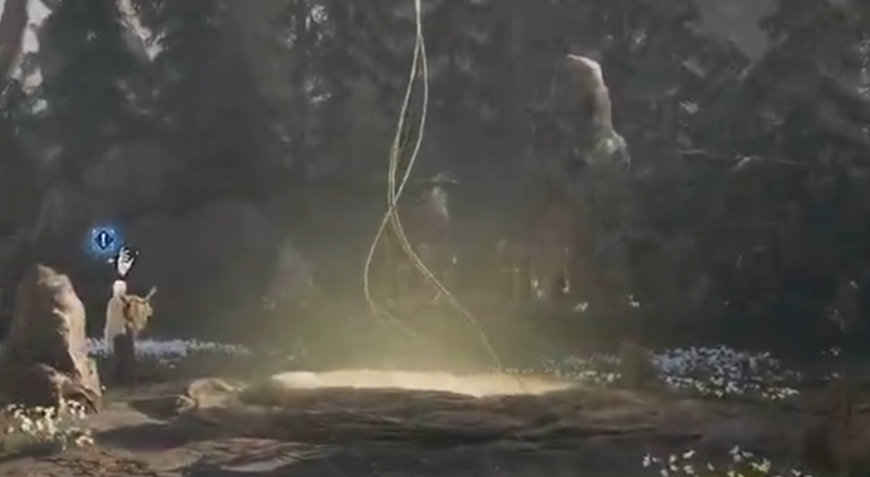
The appearance editor is located at the Gyldenblod Pool in camp, directly in front of Dew. Interacting with the pool reopens the character customization screen, where you can redesign your existing character in exchange for Gyldenblod.
Jump To Section:
Appearance Editor Location
How to Change Appearance
Appearance Change Cost
What You Can Change
Appearance and Class Changes
Gylden Pool Not Working
Where to Change Your Appearance
Return to the main camp and find Dew. The Gylden Pool is the circular pool or well positioned directly in front of her.
The interaction belongs to the pool itself, not Dew’s normal conversation menu. This is easy to miss because both character systems are located in the same small area. Dew handles class-related options, while the Gylden Pool is used to change how your character looks.
How to Change Appearance in Mistfall Hunter
Walk up to the Gylden Pool and use its interaction prompt. This opens the same type of customization screen used during character creation, allowing you to adjust your character before applying the new appearance.
Once you are happy with the changes, continue to the confirmation screen and pay the displayed Gyldenblod cost. The new design is then applied to your existing character, so there is no reason to create another one simply because you want a different face or hairstyle.
You also do not need an appearance ticket, premium shop item, or special expedition drop. Everything is handled through the pool in camp.
How Much Does It Cost to Change Appearance?
Changing your appearance costs Gyldenblod. The required amount appears in the editor before you confirm the redesign, giving you a chance to review both the character and the price before spending anything.
If you are short on Gyldenblod, complete more expeditions, extract with valuable loot, and sell equipment you no longer need. Currency received from quests and cipher rewards can also help cover the cost.
Take time to check the finished character before confirming. Returning to the Gylden Pool for another redesign means paying for another appearance change.
What Can You Change?
The Gylden Pool lets you revisit the cosmetic settings from character creation, including options such as your character’s face, hairstyle, hair color, and other facial details available in the editor.
Open each category before confirming so you can see the full selection for your character. The editor only affects visual customization and does not change your combat build, equipment, level, skills, or quest progress.
Changing Appearance Is Separate From Changing Class
Dew and the Gylden Pool are located beside one another, but they control different parts of your character. The pool changes your physical appearance, while Dew is used when you want to switch between Mercenary, Sorcerer, Blackarrow, Shadowstrix, Seer, and Withered Knight.
Changing your face or hair does not replace your class or reset your build. Likewise, switching to another class does not require you to redesign the character.
Our Mistfall Hunter class-switching guide explains how to change classes through Dew and what can prevent the option from working.
If you are considering a class change specifically for fighting other players, our Mistfall Hunter best PvP class guide compares the strongest options for solo and trio combat.
Why Is the Gylden Pool Not Working?
Make sure you are interacting with the edge of the pool rather than speaking directly to Dew. Move around the structure until the correct interaction prompt appears.
You also need to be inside the normal camp. Appearance editing is unavailable during an expedition, so finish the run or return to the hub before trying again.
New characters may need to complete the tutorial and early camp introductions before every hub interaction becomes available. Continue through the opening progression, return to Dew’s area, and check the pool again.
If the editor opens but you cannot confirm the change, check your Gyldenblod balance and make sure you have actually selected a different appearance option. Restarting the game can also restore a missing interaction prompt if the camp interface fails to load correctly.
Changing Your Character’s Look
To change your appearance in Mistfall Hunter, return to camp and interact with the Gylden Pool directly in front of Dew. Adjust the available cosmetic settings, review the new design, and pay the displayed Gyldenblod cost to apply it.
The system edits your existing character, allowing you to keep playing without restarting your progression or creating another slot.