The Splitter in Moon Sweepers lets you send capsules from one conveyor into two separate routes, making it useful when several machines need material from the same supply line. It's especially handy for Moonstone production, where some lunar dust needs to be processed into sand while the rest stays untreated. Getting the connections right is straightforward once you understand which direction everything needs to move.
Jump To Section:
How to Get a Splitter
How to Connect and Use Splitters
Where Splitters Are Most Useful
Splitter Not Working?
How to Get a Splitter in Moon Sweepers
Splitters are available through the Logistics section of the Building Tool's construction menu.
If you haven't purchased the Building Tool yet, it costs $50 at the Supply Wall. Once equipped, you can access the game's construction options, including conveyors and the equipment used to direct capsules between machines.
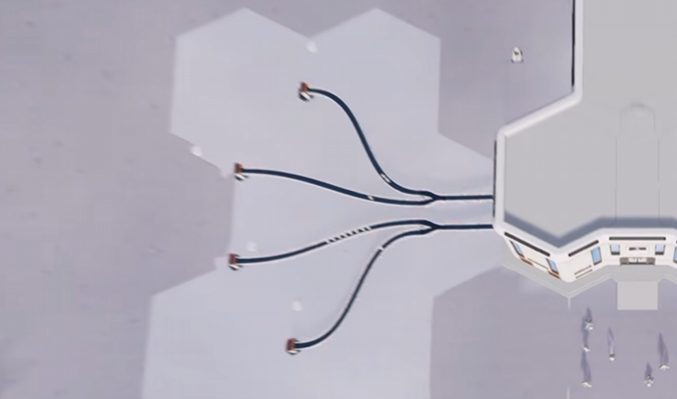
A Splitter has one main purpose: dividing an incoming conveyor route into two outgoing branches.
It's different from a Merger, which combines two incoming routes into a single output. You need a Splitter when you want to distribute material, not collect it into one line.
How to Connect and Use Splitters
To use a Splitter, place it where you want an existing capsule route to branch toward two destinations. The incoming Conveyor needs to connect to the Splitter's input, while its outputs feed the separate routes.
- Equip the Building Tool and open Logistics.
- Select the Splitter and position it along your planned conveyor route.
- Orient the Splitter so its input faces the incoming capsules.
- Connect the incoming Conveyor to the Splitter.
- Run separate Conveyors from its two outputs toward your chosen destinations.
- Send a few capsules through the system and check that both paths work.
Pay close attention to the conveyor arrows when placing each segment. A belt facing away from the intended destination can prevent material from reaching the machine, even when the connection looks correct.
Patch 1.0.3 introduced direct port-to-port snapping for Splitters and Mergers, making it possible to connect logistics components without always needing an extra length of Conveyor between them.
If the Splitter refuses to snap beside another machine, try moving it slightly farther away and connecting the gap with a short Conveyor instead.
Does a Splitter Divide Dust Evenly?
You shouldn't assume that each output receives exactly half the incoming dust without checking your setup.
The available information doesn't establish a guaranteed 50/50 distribution rate under every condition, particularly when one output becomes blocked or its destination stops accepting material.
If you're building a factory that requires specific quantities of dust on each branch, I'd watch the actual deliveries before depending on an exact split.
The important distinction is that a Splitter creates separate delivery paths. It doesn't automatically guarantee that the machines connected to those paths will receive the precise quantities they need.
Where Splitters Are Most Useful
My first choice for using a Splitter would be a production line feeding a Pressure Chamber and Stone Press.
The Stone Press requires both raw lunar dust and Moon Sand. Since the Pressure Chamber converts dust into sand, sending every capsule through the Chamber would leave the Press without its second ingredient.
A Splitter solves the routing problem by giving the incoming dust two destinations.
Splitter Setup for Moonstone Production
Start with a dust supply coming from a Packager, Garage silo, or another compatible capsule source.
Connect that incoming line to a Splitter and arrange the outputs as follows:
- First output: Send raw dust toward the Pressure Chamber, which processes it into Moon Sand.
- Second output: Send untreated dust directly toward the Stone Press's dust input.
Next, connect the Pressure Chamber's Moon Sand output to the Stone Press's separate sand input.
Finally, connect the Stone Press's finished Moonstone output to your selling line.
The Stone Press consumes 1 kg of dust and 1 kg of sand per production cycle, so both materials must arrive for the machine to operate.
I'd start with a single Splitter and check that the Stone Press receives both ingredients before adding more branching conveyors. If one input stays empty, follow that specific route backward instead of rebuilding the whole production line.
Using Multiple Splitters
Splitters also make it possible to supply more than two destinations from one incoming route.
For example, you can connect another Splitter to one of the first Splitter's output branches, creating additional paths to separate machines.
That doesn't increase the amount of dust entering the system. It simply distributes the available material across more destinations.
As you add branches, each connected machine competes for part of the same supply. If you're feeding too many machines from a small dust source, some will spend time waiting for capsules.
For general conveyor delivery and station connections, our Moon Sweepers Auto Selling Guide covers the rest of the transport system.
Moon Sweepers Splitter Not Working? What to Check
If capsules aren't moving through your Splitter properly, the first thing I'd inspect is the connection itself.
Most troubleshooting starts with identifying whether the material reaches the Splitter and, if it does, where it stops afterward.
Capsules Aren't Entering the Splitter
Check the incoming Conveyor's direction and alignment. The belt needs to deliver capsules into the Splitter's input port.
If the belt ends beside the structure instead of connecting to the port, the capsules may never enter it.
Only One Output Is Receiving Capsules
Inspect both outgoing paths before assuming the Splitter is malfunctioning.
Check that each branch is connected correctly and that its destination can accept the incoming material.
It's also worth watching several capsules rather than judging the entire setup from a single delivery. Without a confirmed distribution rule, one capsule isn't enough to establish how the Splitter is behaving.
The Splitter Won't Connect to Another Machine
Try changing the component's orientation or leaving a little space for a short Conveyor section.
Direct snapping was improved in Patch 1.0.3, so make sure your game is updated if you're using an older build.
The same patch also fixed problems involving Splitters and Mergers placed by other crewmates in multiplayer.
One Machine Keeps Running Out of Dust
This doesn't necessarily mean your Splitter is broken.
If several machines depend on the same incoming line, the available dust might simply be insufficient to keep them all supplied.
Before building another Splitter, check whether capsules are arriving regularly at the first one. If the incoming line is frequently empty, adding more branches will only divide an already limited supply.
The Splitter is most useful when you have a clear reason to send capsules in different directions. Start with one incoming line and two working outputs, verify the material reaches both destinations, and expand from there. Once those connections are reliable, Splitters become a practical way to build more complicated production networks without creating a completely separate dust supply for every machine.