Echoes of Aincrad: How to Change Appearance
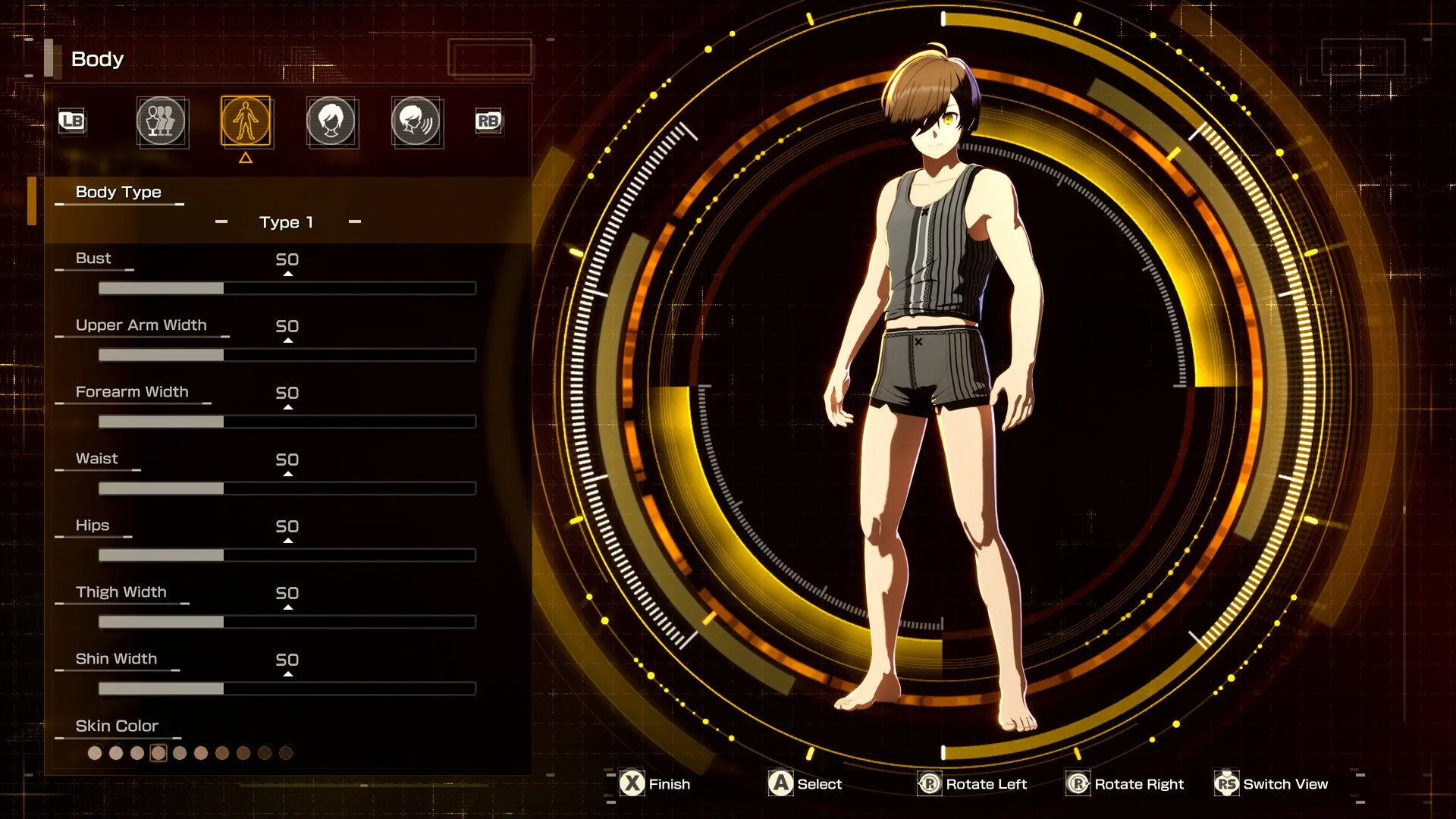
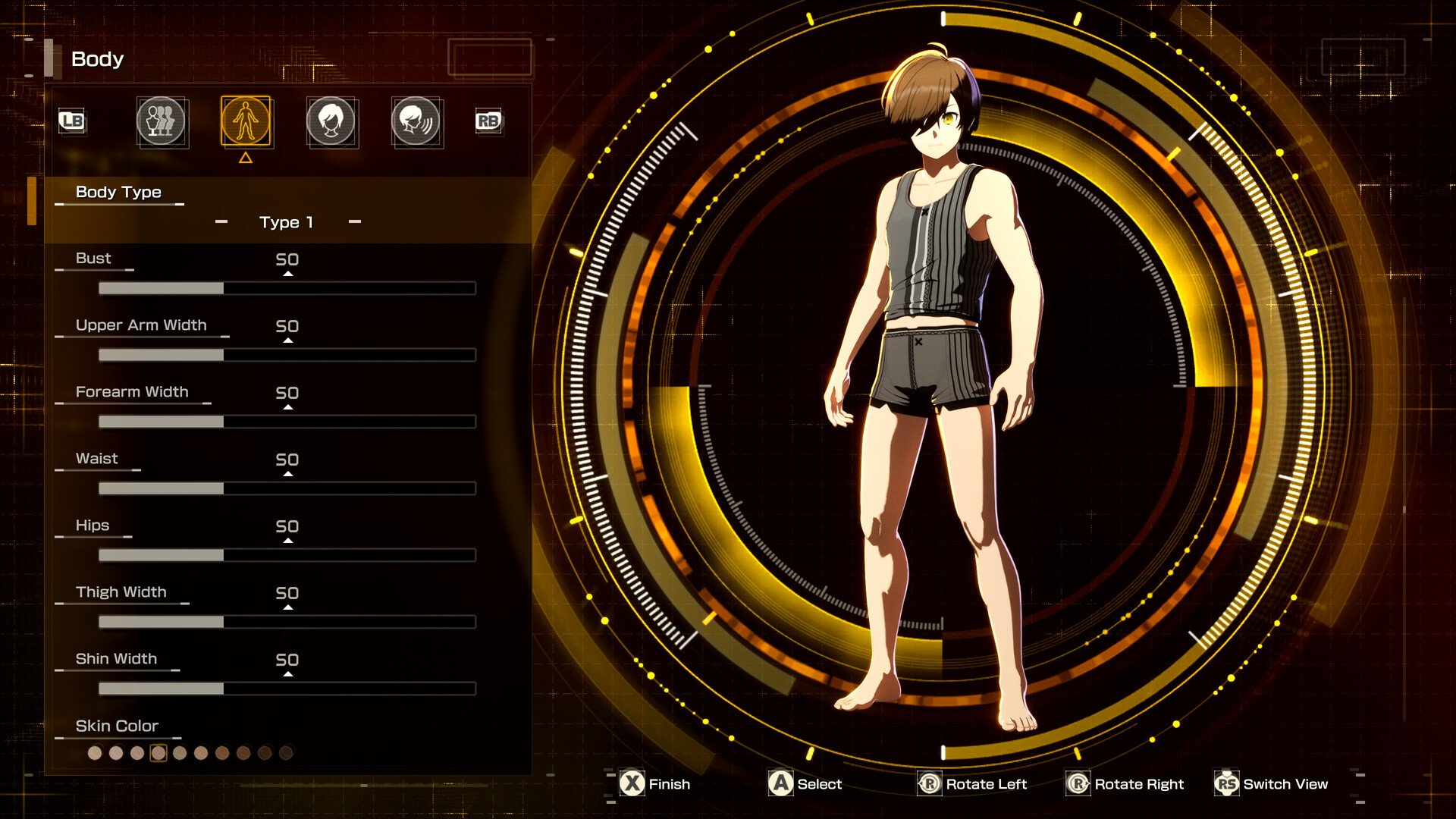
You can change your appearance and customize your character in Echoes of Aincrad after the Prologue, when the game reaches its full character customization sequence. This happens after the early Violet Fencer story stretch, once the opening “beta” portion ends and the game moves into the real Sword Art Online setup.
The important catch is that this is not a normal character editor you can reopen whenever you want. After you finalize your appearance, Echoes of Aincrad does not give you a standard in-game option to freely change your face, hair, body, or voice again. Treat the customization screen as a permanent choice unless you are willing to restart or roll back your save.
Jump To
Do Not Rush the First Character Editor
When Character Customization Unlocks
Can You Change Appearance Later?
What to Check Before Confirming
What to Do If You Picked the Wrong Look
Do Not Rush the First Character Customization
The character editor in Echoes of Aincrad carries more weight than it first appears. When the full customization screen finally opens, you should assume the choices you make there are the ones you will be living with for the rest of the save.
That means you should not click through it just to get back to the story. Check the face, hair, body, and voice carefully before confirming. The game does not currently treat appearance like a barber shop, mirror menu, or cosmetic station you can revisit later. Once the story moves forward, your practical edit options are gone.
| Before Confirming | Why It Matters |
|---|---|
| Check your face settings | Cutscenes make small details more noticeable. |
| Review hair and color | Hair is one of the most visible parts of your avatar during normal play. |
| Confirm body settings | Armor and camera angles can make your character read differently in-game. |
| Test the voice | Voice is hard to ignore once combat and cutscenes begin. |
| Slow down before final confirmation | There is no easy appearance-edit menu afterward. |
This is the rare RPG character creator where the boring advice is also the correct advice: take the extra minute. Future you will not care that you saved 20 seconds. Future you will care if your character sounds wrong for the next 40 hours.
When Character Customization Unlocks
Character customization unlocks after the Prologue in Echoes of Aincrad. More specifically, it happens after the early story section around The Violet Fencer 2, once you finish the opening dungeon stretch and the game transitions out of its beta-style setup.
Depending on how much you explore, this can take a few hours. Players who follow the main route directly will reach it faster, while anyone testing weapons, clearing side content, or wandering around the early zones will naturally take longer.
| Customization Unlock | Details |
|---|---|
| Unlock point | After the Prologue |
| Story section | After The Violet Fencer 2 stretch |
| Available at the start? | No |
| Full appearance editor? | Yes, during the story customization sequence |
| Repeatable later? | No normal in-game edit option after confirming |
So if you start the game and wonder why you are not immediately building your ideal avatar, that is normal. Echoes of Aincrad delays the real customization moment for story reasons instead of opening with the full creator.
Can You Change Appearance Later?
You cannot freely change your appearance later through a normal in-game menu after finishing the main customization sequence. Once your avatar is confirmed, Echoes of Aincrad locks that appearance for the save.
This includes the major cosmetic choices players usually care about most: face, hair, body, and voice. You can still change equipment as you progress, but that is not the same as reopening the character creator. Gear changes your outfit. It does not fix a face, body, or voice choice you regret.
If you finalized by mistake, your realistic options are to keep playing, restart, or use platform save management if you are comfortable with the risk. The game itself does not hand you a clean “edit appearance” button after the story sequence.
What You Can Change
When the full character customization sequence unlocks, you can change your avatar’s main appearance features. This is the moment to create the version of your character you actually want to see in the full game.
| Customization Option | What to Watch For |
|---|---|
| Face | Check the shape and details carefully before confirming. |
| Hair | Review both the style and color because they stay highly visible. |
| Body | Make sure the build looks right before armor starts changing the silhouette. |
| Voice | Listen carefully if the creator gives you a preview. |
The voice is the one I would double-check the most. A face you slightly dislike can fade into the background once you are wearing gear. A voice you dislike announces itself constantly, usually right when you are trying to enjoy the game.
What to Check Before Confirming
Before you confirm your character, go through the editor like you are making a final save file, not a temporary avatar. Look at the character from every angle the editor allows, check the colors in the available lighting, and make sure the voice matches what you actually want.
Do not assume the game will give you a mirror, salon, or post-prologue edit station later. That assumption is how players end up restarting several hours in because one rushed confirmation turned into a permanent problem.
| Final Check | Good Rule |
|---|---|
| Face | Make sure it looks right in close-up. |
| Skin tone | Check it against the editor lighting as carefully as possible. |
| Hair | Confirm color, highlights, and style before moving on. |
| Body | Do not rush past the silhouette and proportions. |
| Voice | Preview it more than once if the option is available. |
If something feels slightly off, fix it before confirming. This is one of those moments where being picky is not vanity. It is damage prevention.
What to Do If You Picked the Wrong Look
If you picked the wrong appearance, there is no simple in-game fix. Your options are to keep playing with the character, restart the save, or use platform save deletion or rollback options if you know exactly what you are doing.
Restarting is the cleanest option if you are still close to the customization point. If you are many hours past it, the decision becomes harder. You have to decide whether the appearance mistake bothers you enough to replay the Prologue and early story content.
| Option | When It Makes Sense |
|---|---|
| Keep playing | The mistake is minor or you are already far into the game. |
| Restart | You are still early and the appearance issue will bother you long-term. |
| Delete or manage save data | You understand your platform’s save system and accept the risk. | Wait for an update | You do not want to restart and can tolerate the issue for now. |
If you are considering deleting save data, be careful. PC, PlayStation, and Xbox handle local saves, cloud saves, and demo carry-over differently. Do not start deleting files unless you are willing to lose progress. That is not a character edit. That is surgery with a hammer.
Why Customization Happens Later
Echoes of Aincrad delays appearance customization because it is tied to the Sword Art Online story setup. The early game treats your starting avatar as part of the opening structure, then shifts into the full identity reveal after the Prologue.
After the beta-style opening ends, the story brings in the full-release premise, the NerveGear setup, and the moment where the avatar’s appearance becomes tied to the person behind the character. That is why the customization sequence happens later instead of appearing before the first playable scene.
As a story beat, the delay makes sense. As a player experience, it is less forgiving, because the game also does not provide a simple way to revise your look afterward. The best approach is to understand that before you reach the editor, then treat the customization screen like a final decision when it appears.
More Echoes of Aincrad Guides
If you are still working through the early game, our Echoes of Aincrad Blink Talisman guide explains how to cross the Violet Fencer chasm. If you are deciding how to build your character after customization, our Echoes of Aincrad best weapon types guide breaks down the best weapon choices by playstyle.